| DSP Blockset | Search Help Desk |
Frames and Frame Matrices
Frame vectors and frame matrices are used to represent collections of data points sampled at consecutive times. This section explains how to create frame vectors and frame matrices in Simulink, and how to import frame-based data from the workspace.Working with Frame Vectors (Single-Channel Signals)
A length-M frame vector represents the evolution of one signal over M sample times. The frame bundles these M consecutive samples into a single unit. As an illustration, consider the discrete signal below.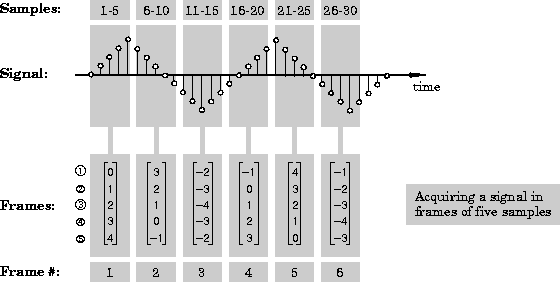
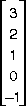
If you acquire five signal samples, beginning with the sixth sample, you see the following sequence:
3
2
1
0
1
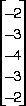
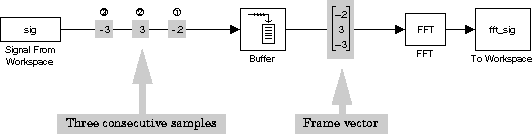
For example, the output from the Buffer block in the figure above is a frame containing three consecutive samples from a single signal,

u(1), is always the earliest sample; the last frame element, here u(3), is always the newest sample. In other words, new samples enter the frame vector at the bottom, and are pushed upwards in the frame as later samples are added.
A more efficient way to create the frame-based signal shown above is to set the Samples per frame parameter of the Signal From Workspace block to 3. The Signal From Workspace block then performs the buffering internally, and directly generates the frame-based signal; the separate Buffer block is not needed.
Importing Frames into Simulink.
Often the data that you acquire (or import) into Simulink from external sources is already in a frame representation. For example, in a real-time system, the analog-to-digital (A/D) converter usually buffers a large segment of the sampled signal before releasing the acquired samples to the host computer (see "Benefits of Frame-Based Processing"). Each such buffer that the A/D hardware propagates to the model is a frame.
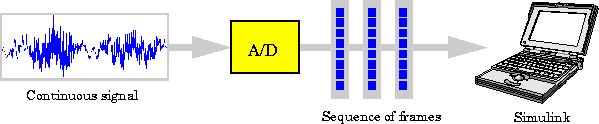
Each frame contains a contiguous block of the sampled signal.
Working with Frame Matrices (Multichannel Signals)
The frame vectors described in the previous section represent consecutive samples from a single signal - one channel of data. You can represent multiple channels of data by using a frame matrix. An M-by-N frame matrix allows you to bundle N channels of frame-based signal data into a single unit. Each of the N matrix columns contains a single frame from one of the signal channels. Each of the M matrix rows therefore contains one sample from each of the N signal channels. So: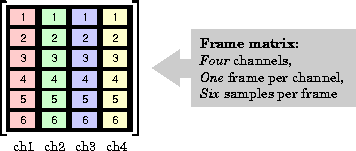 There are four channels (columns) in this matrix, each containing six sequential samples (numbered 1 to 6, above). The four samples in each row all correspond to the same sample instant. The first row,
 u(1,:), contains the earliest set of samples; the last row, u(6,:), contains the newest set of samples. In other words, new samples enter each frame at the bottom, and are pushed upwards in the frame as later samples are added.
As an illustration, consider the three discrete signals below.
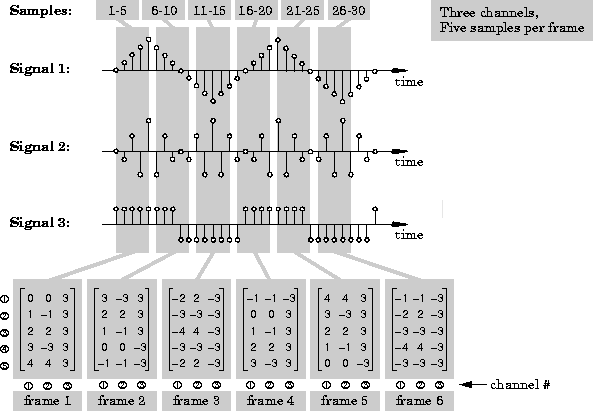
If you sample all three signals over five consecutive sample times, beginning with the first sample time, you see the following set of frames:
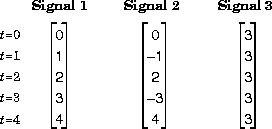
Multiplexing these three frames into a single matrix yields the frame matrix
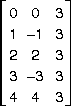
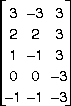
or
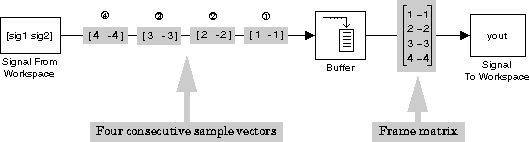
The Signal From Workspace block imports the two channel signal [sig1 sig2], where
sig1 = 1:10'
sig2 = -1:-1:-10'
and outputs one 2-channel sample vector at each sample time. The Frame-based check box of the Signal To Workspace block is selected, and the Number of channels parameter is set to
2. The Buffer size setting in the Buffer block is 4, so the output is a frame matrix containing the four consecutive sample vectors,

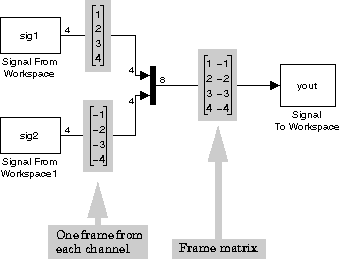
The Samples per frame parameter of each Signal From Workspace block is now set to 4, so that each imports the target signal in frames of four samples. The signals are the same as in the previous example:
sig1 = 1:10'
sig2 = -1:-1:-10'
The Mux block combines the two frames into a 4-by-2 frame matrix with the same result as the previous example. Note that you could also import both channels of data as a frame matrix using a single Signal From Workspace block. Importing Frame Matrices into Simulink. Often, the data that you acquire (or import) into Simulink from external sources is already in a frame matrix representation. For example, in a real-time system, a multichannel A/D card usually buffers a segment of the sampled signals before releasing the acquired samples to the host computer (see "Benefits of Frame-Based Processing"). Each such buffer that the A/D hardware propagates to the model is a frame matrix.
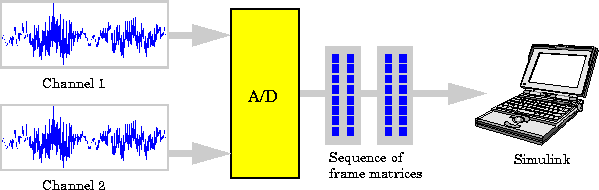
Frame matrices can also be imported directly from the workspace using the Signal From Workspace block. See "Working with Sources and Sinks" in Chapter 3 for more information.
Exporting and Displaying Frame Matrices. A number of blocks allow you to output multichannel frame-based signals to the workspace, file, screen, or sound device. All can be found in the DSP Sinks library: