
| DSP Blockset | Search Help Desk |
Sample Vectors and Sample Matrices
Both vectors and matrices can be used to represent collections of data points sampled at the same time. This section explains how to create sample vectors and sample matrices in Simulink, and how to import sample-based data from the workspace.Working with Sample Vectors
A length-N sample vector represents a snapshot of N independent signals at a particular sample instant. The sample vector bundles these N concurrent samples into a single unit. As an illustration, consider the three discrete signals below.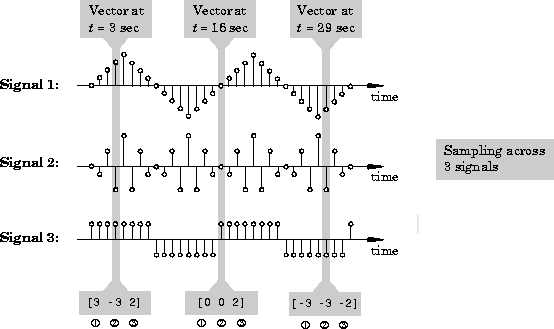
If you simultaneously sample all three signals at t=3, you acquire the following values for each:
-3
2
[3 -3 2]Repeating this at t=16 yields the sample vector
[0 0 2]Each sample vector is a snapshot of the three signals at a particular moment in time. Note
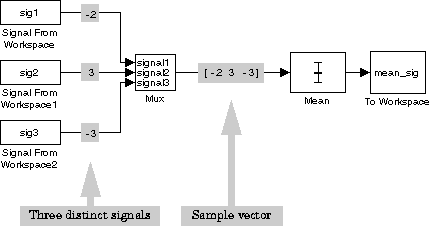
For example, the output from the Simulink Mux block in the figure above is a sample vector containing a single sample from each of the three input signals:
[-2 3 -3]
voice, that contains three channels of voice data. When you import this data into a model using the Signal From Workspace block, the data is output row-wise, as a sequence of sample vectors.
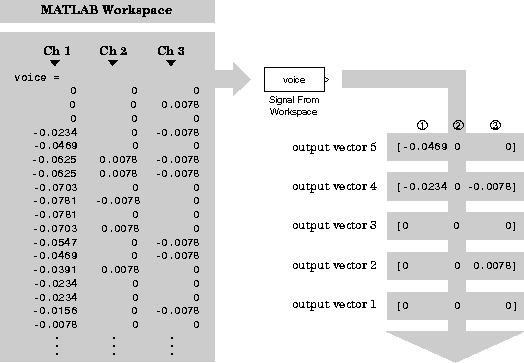
Each sample vector in the output sequence is a snapshot of the three speech signals at a particular sample time. See "Working with Sources and Sinks" in Chapter 3 for additional information about importing data.
Working with Sample Matrices
Sample-based data can also be represented by a matrix. (See also "Understanding Matrices" in this chapter.) In this case, each of the elements of the M-by-N matrix represents an independent signal channel. Just like a sample vector, a sample matrix is a snapshot of multiple (M*N) signals at a single instant in time. The figure below shows a sequence of three 6-by-6 matrices, each containing the instantaneous values of 36 independent signal channels. In this example, each matrix might be a collection of pixel brightness values; the value of each matrix element represents the corresponding pixel brightness at a particular instant.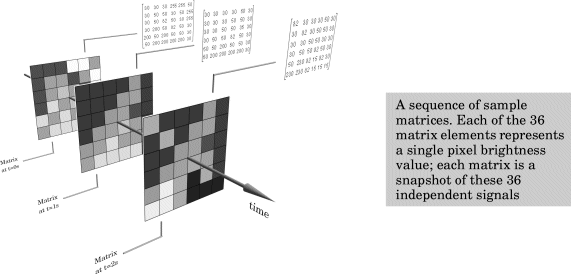
Creating Sample Matrices in Simulink. You create a sample matrix when you concurrently acquire a single scalar sample from each of N*M distinct signals, and multiplex the N*M samples together into a matrix.
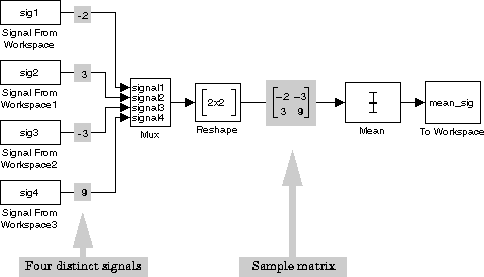
For example, the output from the Reshape block in the figure above is a sample matrix containing a single sample from each of the four input signals,
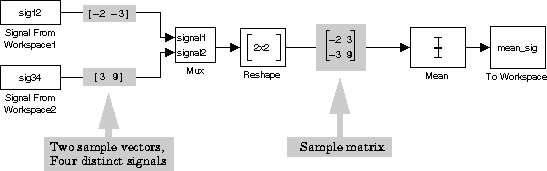
Importing Sample Matrices into Simulink.
Data that you acquire (or import) into Simulink from external sources may already be in sample-based format. For example, you might import a sequence of matrices representing a video segment. The figure below shows a 6-by-6-by-N workspace variable, video, that contains 36 (6 times 6) independent channels of data. When you import this data into a model using the Matrix From Workspace block, the data is output page-wise, as a sequence of sample matrices.
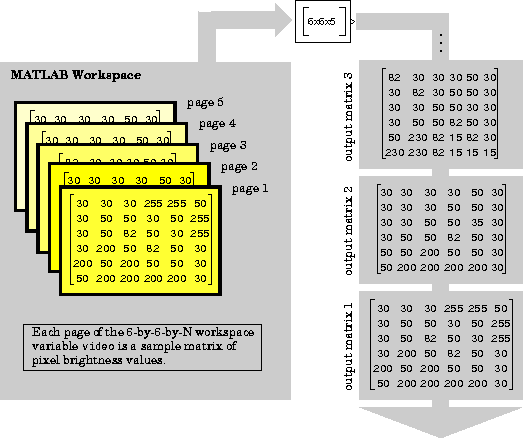
Each matrix in the output sequence contains a snapshot of the video picture at one sample instant. See "Working with Sources and Sinks" in Chapter 3 for additional information about importing data.