| Using Simulink | Search Help Desk |
| Mux |
Combine several input lines into a vector line.
Library
Signals & SystemsDescription
position,velocity in this parameter, the Mux block will have two inputs, named position and velocity.
signalN, where N is the input port number. This option is useful when you are defining a signal bus from which individual signals can be extracted by using the Bus Selector block.
If you define the Number of inputs parameter as a scalar, Simulink determines the input widths by checking the output ports of the blocks feeding the Mux block. If any input is a vector, all of its elements are combined by the block.
If it is necessary to define input widths explicitly, you can specify them as a vector. Include elements with -1 values for those inputs whose widths are to be determined dynamically (during the simulation). If an input signal width does not match the expected width, Simulink displays an error message.
For example, [4 1 2] indicates three inputs forming a seven-element output vector: the first four output elements are from the first input, the fifth element comes from the second input, and the sixth and seventh elements come from the third input. If it is not important that these inputs have fixed widths, you could specify the Number of inputs as 3.
To specify three inputs where the first input vector must have four elements, you could specify [4 -1 -1]. Simulink determines the widths of the second and third inputs and sizes the output width accordingly.
Simulink draws the Mux block with the specified number of inputs. If you change the number of input ports, Simulink adds or removes them from the bottom of the block icon.
Using a Variable to Provide the Number of Inputs Parameter
When you specify the Number of inputs parameter as a variable, Simulink issues an error message if the variable is undefined in the workspace. NoteData Type Support
A Mux block accepts real or complex signals of any data type, including mixed-type vectors.Parameters and Dialog Box
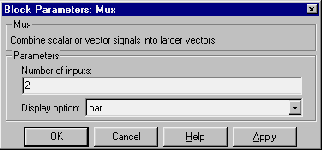
names.| Display Option |
Appearance of Block in Model |
none |
Mux appears inside block icon |
names |
Displays signal names next to each port |
bar |
Displays the block icon in a solid foreground color |