
| DSP Blockset | Search Help Desk |
Specifying Matrix Dimensions
There is one important principle to keep in mind when working with matrices: The block determines the matrix dimension. A matrix signal does not have an intrinsic dimension. The number of rows and columns is determined by the matrix size parameter settings of the block that receives the matrix as an input. (Depending on the block, the matrix size parameter may be called Matrix size, Number of rows, Number of columns, or Number of channels.) Consider the simple model below.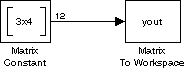
When the Matrix Constant block generates the 3-by-4 matrix
[1 5 9 2 6 10 3 7 11 4 8 12]If the Matrix size parameter in the Matrix To Workspace block is then set correctly, to
[3 4], the constant matrix appears in the workspace with its correct 3-by-4 dimension.
However, if you set the Matrix size parameter to an alternate dimension, such as [4 3], the following matrix is output to the workspace:

[2 6] generates this output:
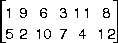
[1 12] and [12 1]. Only dimensions that do not correspond to a 12-element matrix generate an error.
Note
Tracking Matrix Sizes
Because the matrix dimension is determined by the parameter setting in the individual receiving block, it is important to track the dimensions of matrix inputs and outputs. Make sure that the block receiving an M-by-N matrix has its matrix size parameter set appropriately. Examples of appropriate settings for an M-by-N matrix input are:[M N]
N
M
N
Scalars and Vectors
Almost all matrix-processing blocks (sample-based, frame-based, and general) handle scalars and vectors as special cases of matrices. A scalar input is a 1-by-1 matrix, and a length-N vector input is either a 1-by-N or N-by-1 matrix, depending on the input dimensions you enter in the block's matrix size parameter. As mentioned above, the distinction between a column vector and a row vector is made by the individual block based on this parameter setting; Simulink does not have separate data formats for row and column vectors.