| DSP Blockset | Search Help Desk |
| Matrix To Workspace | See Also |
Send a time-sequence of matrices to the workspace.
Library
Matrix Functions, in Math Functions; DSP SinksDescription
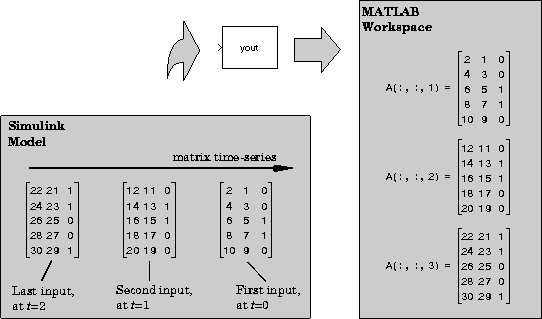
The Matrix To Workspace block writes a three-dimensional array,A, to the workspace, where A contains the acquired samples of a matrix input. At the end of the simulation the block writes every Dth input sample (a matrix) to a page (a two-dimensional slice) of the specified three-dimensional array, where D is specified by the block's Decimation factor parameter. The block writes the first input to the first page of the array, A(:,:,1), and continues adding pages until it writes the last input matrix to the last array page, A(:,:,end).
 To save a record of the actual sample times corresponding to each page of the three-dimensional array, check the Time box in the Save to workspace panel of the Simulation Parameters dialog box. You can access these parameters by selecting Parameters from the Simulation menu, and clicking on the Workspace I/O tab.
Use the Signal To Workspace block to write frame-matrix inputs to the workspace.
Note
To save a record of the actual sample times corresponding to each page of the three-dimensional array, check the Time box in the Save to workspace panel of the Simulation Parameters dialog box. You can access these parameters by selecting Parameters from the Simulation menu, and clicking on the Workspace I/O tab.
Use the Signal To Workspace block to write frame-matrix inputs to the workspace.
Note
Dialog Box
See Also
Matrix From Workspace