| DSP Blockset | Search Help Desk |
| Signal To Workspace | See Also |
Write the time-sequence of an input to the workspace.
Library
DSP SinksDescription
The Signal To Workspace block creates a matrix variable in the workspace, where it stores the output at the end of a simulation. If the output variable name specified in the block's Variable name parameter already exists in the workspace, the original workspace variable is overwritten.Sample-Based Operation
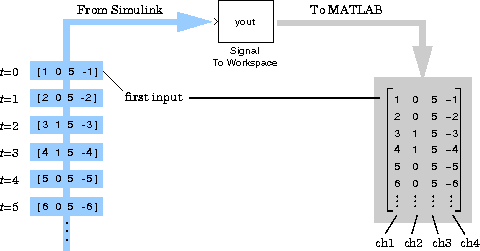
In sample-based mode (Frame-based check box not selected), the block assumes that the input is a 1-by-N sample vector or M-by-N sample matrix. Each of the N vector elements (or M*N matrix elements) is treated as an independent channel, and the block writes each input sample to a row of the workspace matrix (beginning with the first row). A matrix input,u, is written to the workspace matrix as the row vector u(:)'.
Frame-Based Operation
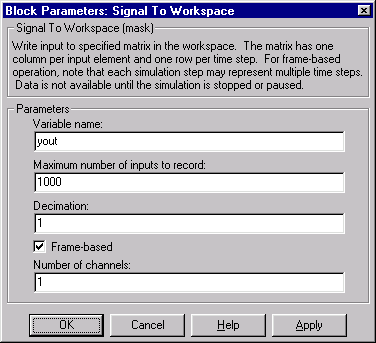
In frame-based mode (Frame-based check box selected), the block assumes that the input is an M-by-N frame matrix. Each of the N frames in the matrix contains M sequential time samples from an independent signal. The Number of channels parameter specifies the number of independent channels (columns, N) in the matrix. The block writes each M-by-N input to M rows of the workspace matrix.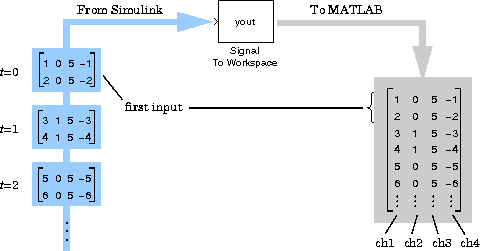 The maximum size of this workspace variable is limited to M*P rows by the Maximum number of inputs to record (P) parameter. (If the simulation progresses long enough for the block to sample more than P times, it stores only the last P inputs.) The Decimation factor, D, allows you to store only every Dth input.
To save a record of the sample time corresponding to each sample value, check the Time box in the Save to workspace parameters list of the Simulation Parameters dialog. You can access these parameters by selecting Parameters from the Simulation menu, and clicking on the Workspace I/O tab.
Note
The maximum size of this workspace variable is limited to M*P rows by the Maximum number of inputs to record (P) parameter. (If the simulation progresses long enough for the block to sample more than P times, it stores only the last P inputs.) The Decimation factor, D, allows you to store only every Dth input.
To save a record of the sample time corresponding to each sample value, check the Time box in the Save to workspace parameters list of the Simulation Parameters dialog. You can access these parameters by selecting Parameters from the Simulation menu, and clicking on the Workspace I/O tab.
Note
inf is specified for either the Maximum number of inputs to record parameter or the simulation Stop time parameter (in the Simulation Parameters dialog box).
If you expect to generate code for the block's frame-based mode, you should ensure that inputs to the block are contiguous in memory. See the Contiguous Copy block for more information.
Dialog Box
1000 samples (frames).1.See Also
Matrix To Workspace