 = 2
= 2 ,
,  = 0
= 0
| DSP Blockset | Search Help Desk |
| Sine Wave | See Also |
Generate samples of one or more sine waves over time.
Library
DSP SourcesDescription
The Sine Wave block generates one or more sinusoidal signals with independent amplitude, frequency, and phase characteristics. The Amplitude, Frequency, and Phase parameters specify the characteristics (A,, and ) of the generated sine waves. Each parameter value can be a scalar or a length-N vector, where N is the number of sine waves to output. A particular sine wave in the output is defined by the corresponding elements of the A, , and vectors. For example, A5, 5, and 5 define the characteristics of the fifth sinusoid in the output, y5. If a scalar value is specified for one of these parameters, the value is applied to each output sinusoid.
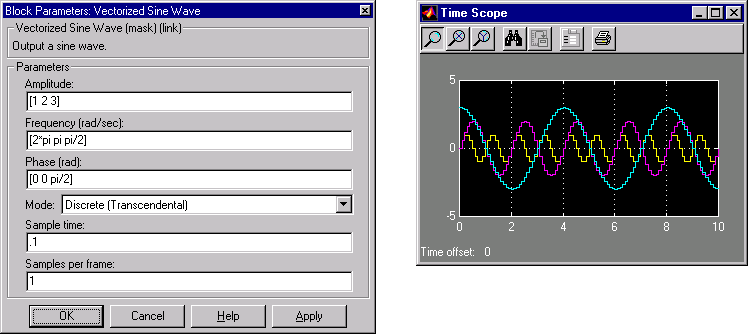
The figure below shows the block dialog configured to generate 3 sinusoidal signals:
The Sample mode parameter specifies the block's sampling property, Continuous or Discrete:
In continuous mode, each sinusoid in the output, yi, is computed as a continuous function

and the block's output is continuous. In this mode, the block's operation is the same as that of the Simulink Sine Wave block when that block's Sample time is set to 0. It offers high accuracy, but requires trigonometric function evaluations at each simulation step, which is computationally expensive. Additionally, because this method tracks absolute simulation time, a discontinuity will eventually occur when the time value reaches its maximum limit.
In discrete mode, the block's discrete-time output can be generated by directly evaluating the trigonometric function, or by a differential method. The two options are explained below.
Discrete Computational Methods
When Discrete is selected from the Sample mode parameter, the Computation method parameter provides two options for generating the discrete sinusoid, Trigonometric functions and Differential method.Each sinusoid in the output, yi, is computed by sampling the continuous function

with a period of Ts, where Ts is specified by the Sample time parameter. This mode of operation is a more efficient (but otherwise identical) implementation of a Simulink Sine Wave block with Sample time set to 0 followed by a Zero-Order Hold block with Sample time set to Ts. It shares the same benefits and liabilities as the Continuous sample mode, described above.
The differential method uses an incremental (differential) algorithm rather than one based on absolute time. The algorithm computes the output samples based on the values computed at the previous sample time and precomputed update terms, making use of the following identities.

The update equations for each sinusoid in the output, yi, can therefore be written in matrix form as

where Ts is specified by the Sample time parameter. Since Ts is constant, the right-hand matrix is a constant and can be computed once at the start of the simulation. The value of Aisin[i(t+Ts)+i] is then computed from the values of sin(it+i) and cos(it+i) by a simple matrix multiplication at each time step.
This mode of operation is the same as that of the Simulink Sine Wave block with Sample time set to a positive number (discrete). It offers reduced computational effort, but is subject to drift over time due to the cumulative quantization errors. Because the method is not contingent on an absolute time, there is no danger of discontinuity during extended operations (when an absolute time variable might overflow). This is therefore the recommended method to use when running long simulations and real-time systems.
Frame-Based Operation
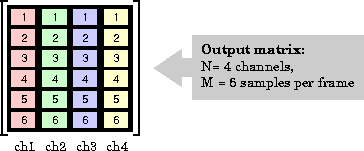
In both discrete modes (differential or transcendental), the block can optionally buffer the output samples into frames. In these modes the block computes and buffers the number of samples (for each individual sine) specified by the Samples per frame parameter value, M, and outputs this frame of samples with a frame period of M*Ts (where Ts is specified by the Sample time parameter). When the Samples per frame value is1 (default), the block successively outputs the individual samples with a sample period of Ts.
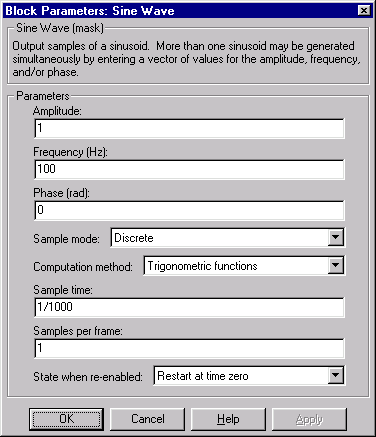
Dialog Box


See Also
Chirpsin (MATLAB)