Generate various waveforms.
Library
Sources
Description
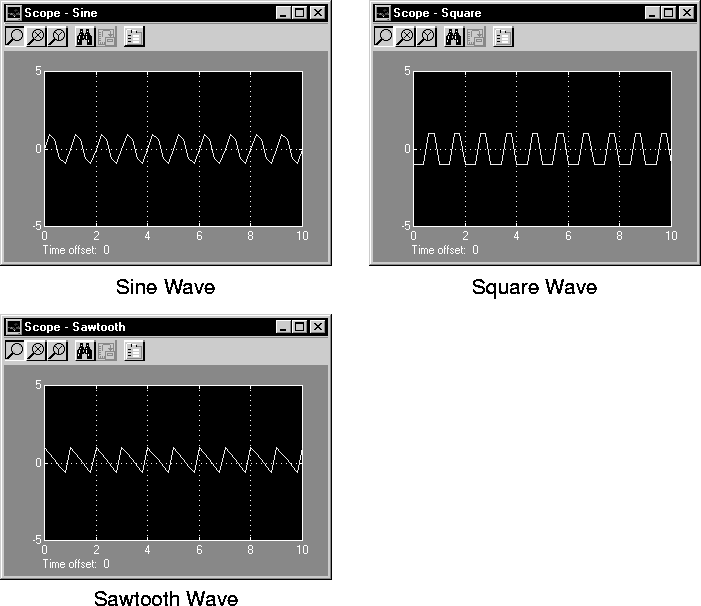
The Signal Generator block can produce one of three different waveforms: sine wave, square wave, and sawtooth wave. The signal parameters can be expressed in Hertz (the default) or radians per second. This figure shows each signal displayed on a Scope using default parameter values.
A negative Amplitude parameter value causes a 180-degree phase shift. You can generate a phase-shifted wave at other than 180 degrees in a variety of ways, including inputting a Clock block signal to a MATLAB Fcn block and writing the equation for the particular wave.
You can vary the output settings of the Signal Generator block while a simulation is in progress. This is useful to determine quickly the response of a system to different types of inputs.
Data Type Support
A Signal Generator block outputs real signals of type double.
Parameters and Dialog Box
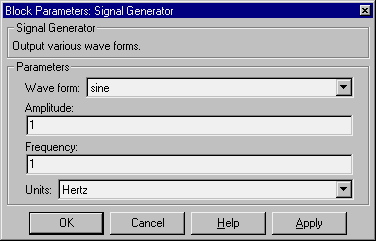
- Wave form
- The wave form: a sine wave, square wave, or sawtooth wave. The default is a sine wave.
- Amplitude
- The signal amplitude. The default is
1.
- Frequency
- The signal frequency. The default is
1.
- Units
- The signal units, Hertz or radians/sec. The default is Hertz.
Characteristics
Sample Time
|
Inherited
|
Scalar Expansion
|
Of parameters
|
Vectorized
|
Yes
|
Zero Crossing
|
No
|
[ Previous | Help Desk | Next ]