| DSP Blockset | Search Help Desk |
| Signal From Workspace | See Also |
Acquire a signal from the workspace, and output at a constant sample rate.
Library
DSP SourcesDescription
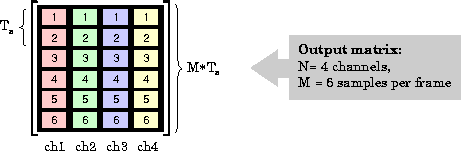
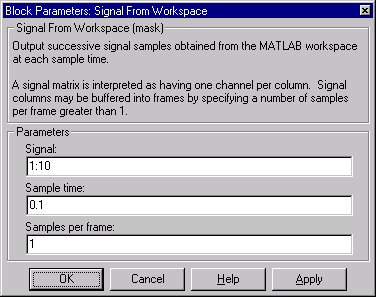
The Signal From Workspace block references a specified vector or matrix in the MATLAB workspace to generate scalar, vector, or matrix output. The Sample time parameter value, Ts, specifies the sample period of the elements in the workspace vector, or the sample period of the rows in a workspace matrix. Each element of a workspace vector, and each row of a workspace matrix is considered to be an individual sample. Matrix columns represent independent channels. The block acquires the number of input samples specified by the Samples per frame parameter value, M, and outputs this frame with a period of M*Ts. When the Samples per frame parameter is set to1 (default), the block successively outputs the individual input samples at the sequence sample period, Ts.
For a general W-by-N workspace matrix, the output size is M-by-N, with each column representing a distinct signal channel. A 6-by-4 output matrix is illustrated below.
Note, however, that a 1-by-N matrix (row vector) is treated as a N-by-1 matrix (column vector), and acquired element-wise rather than row-wise.
Unlike Simulink's From Workspace block, the Signal From Workspace block holds the output value constant between successive output frames (i.e., no linear interpolation takes place), and does not extrapolate past the end of the indicated signal samples. The block outputs zeros (or zero-vectors or zero-matrices, as appropriate) when it has used all of the input samples. Additionally, the initial value is always output at the first simulation step.Dialog Box
See Also
From Wave Device