 ,
,
| DSP Blockset | Search Help Desk |
| From Wave File | See Also |
Read audio data from a Microsoft Wave (.wav) file (Windows 95/98/NT only).
Library
DSP SourcesDescription
The From Wave File block reads audio data from a Microsoft Wave (.wav) file and outputs a double-precision signal with amplitudes in the range ±1. The audio data must be in the uncompressed PCM (pulse code modulation) format.
y = wavread('filename') % equivalent MATLAB code
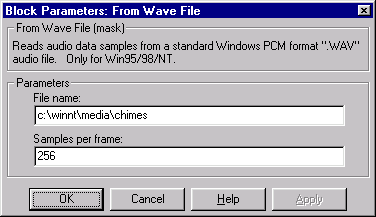
The File name parameter can specify an absolute or relative path to the file. If the file is on the MATLAB path or in the current directory (the directory returned by typing pwd), you need only specify the file's name. You do not need to specify the .wav extension in either case.
The output from the block, y, is a length-M frame of audio data from a mono signal, or an M-by-2 matrix containing one frame of audio data from each channel of a stereo signal. The frame size, M, is specified by the Samples per frame parameter. The output frame period, Tfo, is
,
Dialog Box
See Also
From Wave Devicewavread (MATLAB)