| DSP Blockset | Search Help Desk |
| To Wave File | See Also |
Write audio data to file in the Microsoft Wave (.wav) format (Windows 95/98/NT only).
Library
DSP SinksDescription
The To Wave File block writes audio data to a Microsoft Wave (.wav) file in the uncompressed PCM (pulse code modulation) format. For compatibility reasons, the sample rate of the discrete-time input signal should typically be one of the standard Windows audio device rates (8000, 11025, 22050, or 44100 Hz), although the block supports arbitrary rates.
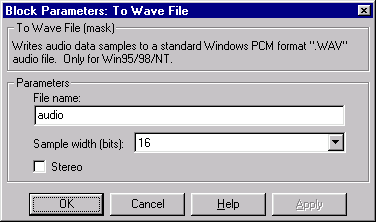
The input to the block, u, can be a vector containing a frame of audio data from a mono signal, or a 2-column matrix containing one frame of audio data from each channel of a stereo signal. (The Stereo check box should be selected in this case.)
wavwrite(u,Fs,bits,'filename') % equivalent MATLAB code
The amplitude of the input should be in the range ±1. Values outside this range are clipped to the nearest allowable value.
The Sample rate parameter specifies the value, Fs, to record in the Wave file as the data's sample rate; a value of -1 instructs the block to use the sample rate of the input as this value.
The Sample Width (bits) parameter specifies the number of bits used to represent the signal samples in the file. Two settings are available:
.wav extension.
Dialog Box
See Also
From Wave Filewavwrite (MATLAB)