| DSP Blockset | Search Help Desk |
| Histogram | See Also |
Compute the histogram (frequency distribution) of an input or sequence of inputs.
Library
Statistics, in Math FunctionsDescription
The Histogram block computes the frequency distribution of the elements in the input vector, or tracks the frequency distribution in a sequence of inputs over a period of time. The Running histogram parameter allows you to toggle between basic operation and running operation, which are both described below.Basic Operation
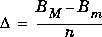
When the Running histogram check box is not selected, the block computes the frequency distribution in the input independently at each sample time. The block sorts the elements of the input (by their absolute value) into a number of discrete bins, as specified by the Number of bins parameter, n.y = hist(u(:),n) % equivalent MATLAB codeThe upper-boundary of the highest-valued bin is specified by the Maximum value of input parameter (BM), and the lower-boundary of the lowest-valued bin is specified by the Minimum value of input parameter (Bm). Each bin has width

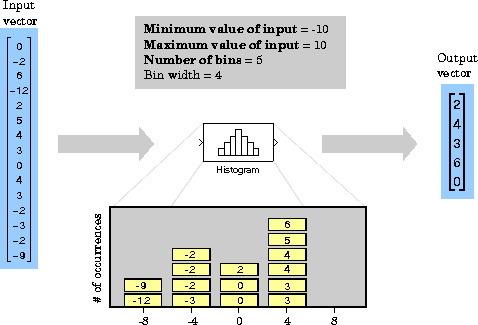
When the Normalized check box is selected, the block scales the output so that sum(y)=1.
u(:).
Running Operation
When the Running histogram check box is selected, the block tracks the frequency distribution of a sequence of inputs over time. You can choose frame-based or sample-based operation by selecting (or deselecting, respectively) the Frame-based check box. Sample-Based Operation. When the Frame-based check box is not selected (default), the block accepts a scalar input at theIn port, and adds each successive scalar input value to the histogram. The block retains past inputs in the histogram as long as the Rst input remains zero. When the block receives a nonzero scalar value at the Rst port, it resets the histogram by emptying all the bins. If you do not need to reset the running histogram during the simulation, you can delete the Rst port from the block icon by deselecting the Reset port check box.
At each sample time the block outputs a vector whose elements (one per bin) represent the frequency of occurrence of the binned input values currently in the histogram. The following example illustrates the block's operation for parameter values of Bm = -10, BM = 10, and n = 5. The resulting bin width is 4.
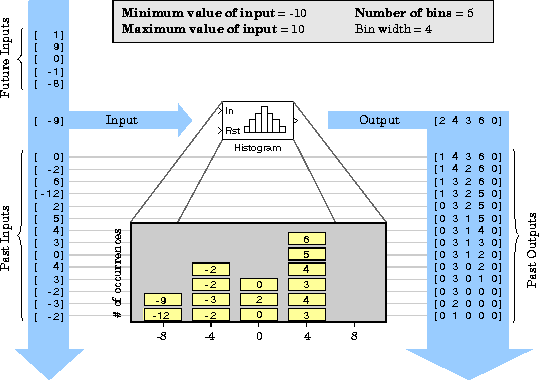
Note that the block has direct feedthrough, so the output histogram is updated with the new input at the same sample time that it is received.
Frame-Based Operation. When the Frame-based check box is selected, the block accepts a length-M frame vector containing M sequential time-samples from a single channel. The elements in each successive vector input are added the histogram and retained as long as theRst input remains zero. When the block receives a nonzero value at the Rst port, it resets the histogram by emptying all the bins.
Note
Dialog Box
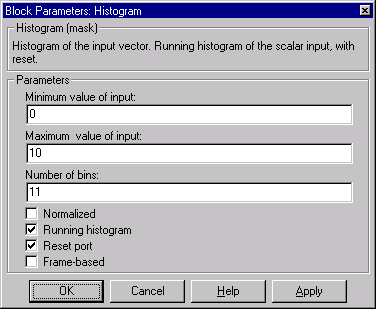

1. This parameter is not tunable in Simulink's external mode.Rst input port.See Also
Sorthist (MATLAB)