| DSP Blockset | Search Help Desk |
| Contiguous Copy | See Also |
Recreate the input in a contiguous block of memory (for code generation).
Library
Elementary Functions, in Math FunctionsDescription
The Contiguous Copy block copies the input to a contiguous block of memory, and passes this new copy to the output. The output is identical to the input, but is guaranteed to reside in a contiguous section of memory. Because Simulink employs an efficient copy-by-reference method for propagating data in a model, many operations produce outputs with discontiguous memory locations. An example of such an operation is shown below with the Simulink Selector block: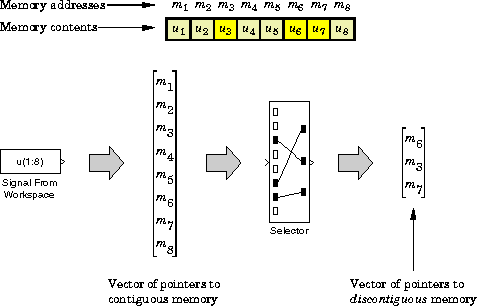
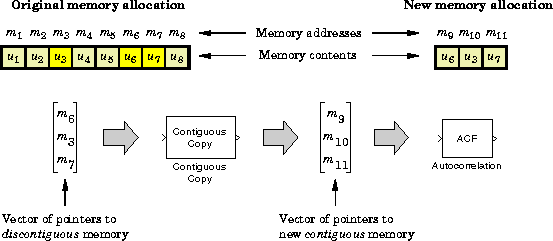
Although this does not present a problem during simulation, a number of blocks in the DSP Blockset require contiguous inputs for code-generation with the Real-Time Workshop (RTW). When these blocks (listed below) are used in a model intended for code generation, they should be preceded by the Contiguous Copy block to ensure that their inputs are contiguous. The Autocorrelation block is an example of one that requires contiguous inputs for code generation:
Blocks Requiring Contiguous Inputs for Code Generation
The table below lists the blocks requiring contiguous inputs for code generation. In some cases, a block requires contiguous inputs for one mode of operation, but not for another. This is noted in the right column of the table where appropriate.Dialog Box
See Also
Convert Complex Simulink To DSP