| DSP Blockset | Search Help Desk |
| Minimum | See Also |
Find the minimum value of an input or sequence of inputs.
Library
Statistics, in Math FunctionsDescription
The Minimum block identifies the value and position of the smallest element in the input, or tracks the minimum value in a sequence of inputs over a period of time. The Mode parameter specifies the block's mode of operation and can be set to Value, Index, Value and Index, or Running. These settings are described below.Value
When Mode is set to Value, the block computes the minimum value of the input vector.[y,i] = min(u(:)) % equivalent MATLAB code
abs(u(:)), to identify the minimum. The output is the corresponding complex value from the input. 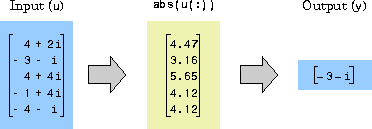
Index
When Mode is set to Index, the block performs the computation shown above, and outputs the index, i, corresponding to the position of the minimum value in the input vector. The index is an integer in the range[1 length(u(:))].
If there are duplicates of the minimum value in the input, the index corresponds to the first occurrence. For example, if the vector input is [1 2 3 2 1], the index of the minimum value is 1, not 5.
Value and Index
When Mode is set to Value and Index, the block outputs both the value, y, and the index, i. In all three of the above modes, a matrix input,u, is treated as a vector, u(:).
Running
When Mode is set to Running, the block tracks the minimum value in a sequence of inputs over time. You can choose frame-based or sample-based operation by selecting (or deselecting, respectively) the Frame-based check box. Sample-Based Operation. When the Frame-based check box is not selected (default), the block assumes that the input at theIn port is a 1-by-N sample vector or M-by-N sample matrix. Each of the N vector elements (or M*N matrix elements) is treated as an independent channel, and the block tracks the minimum value in each of the channels over time.
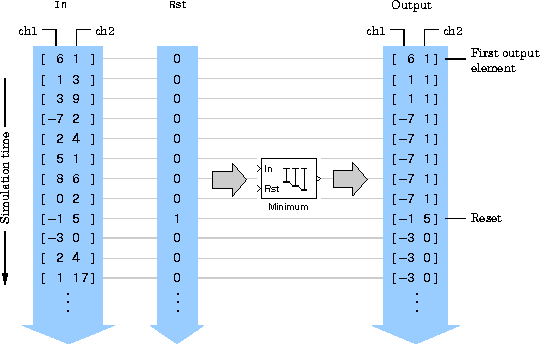
The block resets the running minimum when the scalar input at the optional Rst port is nonzero. The block's output is the same size as the input, and contains the minimum for each input channel since the last reset.
Rst port from the block icon by deselecting the Reset input check box.
Frame-Based Operation.
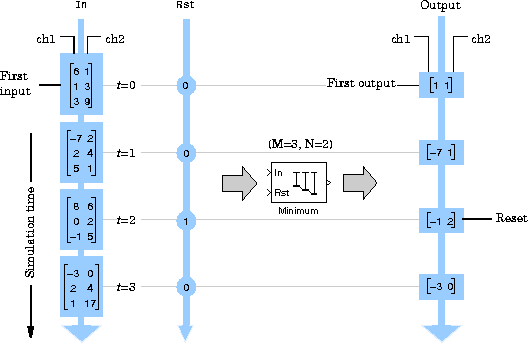
When the Frame-based check box is selected, the block assumes that the input at the In port is an M-by-N frame matrix. Each of the N frames in the matrix contains M sequential time samples from an independent signal. The Number of channels parameter specifies the number of independent signals, N, in the matrix.
The block tracks the minimum value in each of the N independent channels over time, and resets the running minimum when the input at the Rst port is nonzero. The output is a sample vector of length N which contains the minimum for each input channel since the last reset.
Note
If you expect to generate code for the Minimum block's running mode using the Real-Time Workshop, you should ensure that inputs are contiguous in memory. See the Contiguous Copy block for more information.
Dialog Box
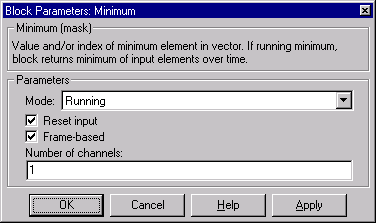
Rst input port.See Also
Maximummin (MATLAB)