Read data from the workspace.
Library
Sources
Description
The From Workspace block reads data from the MATLAB workspace. The block's Data parameter specifies the workspace data via a MATLAB expression that evaluates to a matrix or structure containing a table of signal values and time steps. The format of the matrix or structure is the same as that used to load inport data from the workspace (see "Loading Input from the Base Workspace"). The From Workspace icon displays the expression in the Data parameter.
If the input table does not specify the times of the input data values, each value is assumed to occur at t = (n-1) * st where n is the nth input value and st is the block's sample time.
The output of a From Workspace block at each time step depends on the settings of the block's Interpolate data and Hold final data value parameters. The following table summarizes the output for the various combinations of parameter settings.
Intrp.
Option
|
Hold
Option
|
Block Output
ti < t < tf
|
Block Output
t > tf
|
On
|
Off
|
Interpolated between data values
|
Extrapolated from final data value
|
On
|
On
|
Interpolated between data values
|
Final data value
|
Off
|
Off
|
Most recent data value
|
Zero
|
Off
|
On
|
Most recent data value
|
Final data value
|
If the input table contains more than one entry for the same time step, Simulink uses the signals specified by the last entry. For example, suppose the input table has this data:
time:     0 1 2 2
signal:   2 3 4 5
At time 2, the output is 5, the signal value for the lastentry for time 2.
Note
A From Workspace block can directly read the output of a To Workspace block (see To Workspace) if the output is in structure or structure-with-time format (see "Loading Input from the Base Workspace" for a description of these formats). To read a matrix written by a To Workspace block requires that a time column be added to the matrix.
Data Type Support
A From Workspace block can output a real or complex signal of any data type.
Parameters and Dialog Box
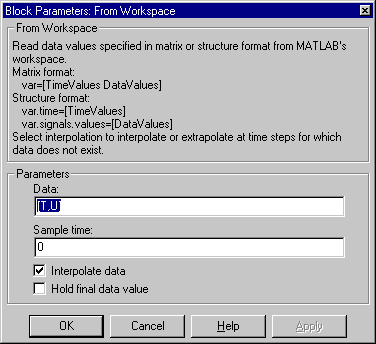
- Data
- An expression that evaluates to a matrix or a structure containing a table of simulation times and corresponding signal values. For example, suppose that the workspace contains a column vector of times named
T and a matrix of corresponding signal values named U. Then the default expression for this parameter, [T,U], yields a matrix containing the required input table. If the required signal-versus-time matrix or structure already exists in the workspace, simply enter the name of the structure or matrix in this field.
- Sample time
- Sample rate of data from workspace.
- Interpolate data
- This option causes the block to linearly interpolate (or extrapolate, if the Hold final data value parameter is off) at time steps for which no corresponding workspace data exists. Otherwise, the current output equals the output at the most recent time for which data exists.
- Hold final data value
- This option causes the block to hold its output to the last value for which data is available.
Characteristics
Sample Time
|
Inherited from driven block
|
Scalar Expansion
|
No
|
Vectorized
|
Yes
|
Zero Crossing
|
No
|
[ Previous | Help Desk | Next ]