Understanding Multichannel Signal Processing
Most signal-oriented blocks in the DSP Blockset are capable of processing both sample matrices and frame matrices.
Consider a series of matrix inputs, u1, u2, u3, each of size 3-by-3.

A matrix-oriented block like Direct-Form II Transpose Filter can interpret this input sequence in two different ways, depending on the setting of the Frame-based inputs check box.
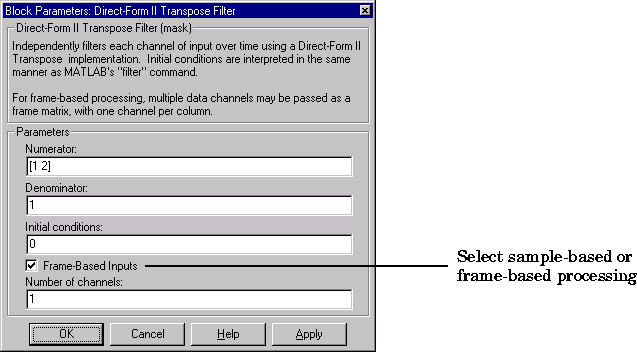
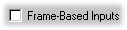 When the Frame-Based Inputs option is not selected, the block views the matrix as a sample matrix, treating the elements of each matrix input as concurrent samples from nine different signals; so, for example,
 u1(1,1) and u1(2,3) are samples from two distinct signals that correspond to the same moment in time.
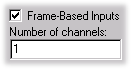 When the Frame-based inputs option is selected, the block views the matrix as a frame matrix, treating each column as a frame of consecutive samples from a distinct channel (sampled over the same time period). The Number of channels parameter indicates the number of columns in the matrix.
In both sample-based and frame-based modes, vector and scalar inputs are treated as special matrix cases. See "Scalars and Vectors" in "Understanding Matrices" earlier in this chapter. The following sections provide some examples of common sample-based and frame-based block operations. See the "DSP Block Reference" chapter for complete information about any particular block.
Example 1: Sample-Based Operation with Vector Input
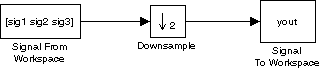
The Downsample block can process both sample-based and frame-based signals. To see how sample-based processing works, build the model below using:
To try the model:
- 1
- Create
sig1, sig2, and sig3 in the workspace by typing the following
commands.
sig1 = (1:1000)';
sig2 = zeros(1000,1);
sig3 = (-1:-1:-1000)';
- 2
- Double-click the Signal From Workspace block and enter
[sig1 sig2 sig3]
in the Signal parameter. This creates a length-3 sample vector, representing three signal channels. The Samples per frame parameter should remain set to 1.
- 3
- Double-click on the Downsample block and enter
2 for the Downsample
factor parameter. Leave the Frame-based inputs parameter unchecked so
that the block will operate in sample-based mode.
- 4
- Set the Stop time in the Simulation Parameters dialog box to
20, and start
the simulation by selecting Start from the Simulation menu.
If you look at output yout in the command window, you can see that the block treats each element of the input vector as a separate channel, and downsamples the signal in each channel over time.
yout =
     0     0     0
     1     0    -1
     3     0    -3
     5     0    -5
     7     0    -7
     9     0    -9
    11     0   -11
    13     0   -13
    15     0   -15
    17     0   -17
    19     0   -19
Each downsampled output signal is half the length of the corresponding input signal, and there is no interaction between the three channels (i.e., between the three elements in each input vector).
Example 2: Sample-Based Operation with Vector Input
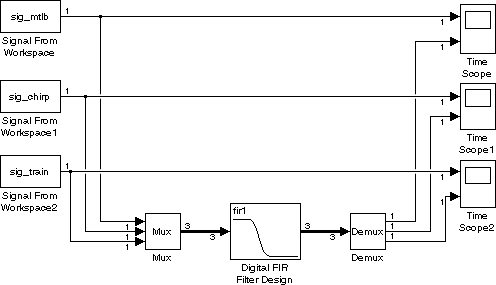
Let's look at how the Digital FIR Filter Design block processes a vector input in sample-based mode. Build the model shown below using:
To try the model:
- 1
- Load three signals into the workspace, and rename them as shown.
load mtlb;
sig_mtlb = mtlb;
load chirp;
sig_chirp = y;
load train;
sig_train = y;
- 2
- Double-click on each Signal From Workspace block in turn and type in one
of the signal names for the Signal parameter:
Enter 1/Fs for the Sample time parameter of each Signal From Workspace block. (Fs is the original sample frequency of the chirp and train signals, and equals 8192 Hz. It is also fairly close to the original sample frequency of the mtlb signal, which is 7418 Hz. For convenience, Fs is used for all three signals in this example.)
When the three signals are multiplexed together (using the Simulink Mux block), the result is a 3-element vector, or 3-by-1 matrix.
- 3
- Double-click on each Time Scope block in turn and press the Properties
button,
 ,to set the scope properties:
Close the Properties windows by pressing OK, but leave the scope window open.
- 4
- Double-click on the Digital FIR Filter Design block, and verify that the
Frame-based inputs check box is not selected.
- 5
- Set the Stop time to
2 in the Simulation Parameters dialog box (available
through the Simulation menu).
- 6
- Start the simulation by selecting Start from the Simulation menu.
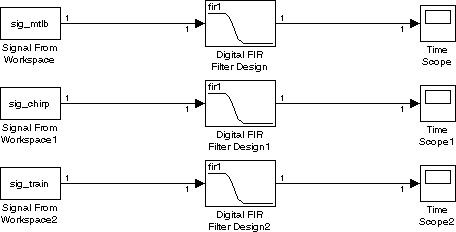
As the simulation runs, you can see that the Digital FIR Filter Design block is filtering each of the three signals independently; there is no interaction between sig_mtlb, sig_chirp, and sig_train (i.e., between the three elements in each input vector).
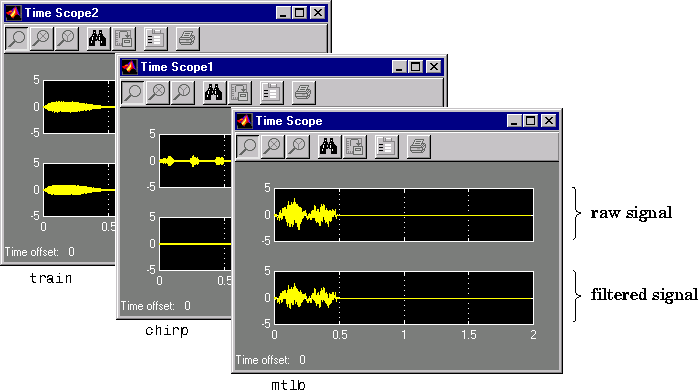
The operation is equivalent to independently filtering the three signals by using three distinct blocks, as shown below.
Note
What happens if you check Frame-based inputs in the Digital FIR Filter Design block dialog box, and set the Number of channels parameter to 3 (the number of signals)? The result is the same as filtering the three signals independently. As a general rule, frame-based processing is identical to sample-based processing when the Number of channels parameter is equal to the number of individual elements in the input.
Example 3: Frame-Based Operation with Vector Input
The FFT block is another good example of a frame-based block. To see how this block processes a frame vector input, build the model below using:
To try the model:
- 1
- Double-click the Sine Wave block enter the following parameter values
- Amplitude =
[1 2]
- Frequency =
[100 25]
- Sample time =
0.001
- Samples per frame =
1
- 2
- Double-click on the Sum block and enter
1 for the List of signs parameter.
- 3
- Double-click on the Shift Register block and set the Register size to
256.
- 4
- Double-click on the Window Function block and set the Operation
parameter to Apply window to input.
- 5
- Double-click on the Complex to Magnitude-Angle block and set the Output
parameter to Magnitude.
- 6
- Double-click on the Frequency Frame Scope block and set the Frequency
units to Hertz. Set the Sample time of original time series to
0.001. Verify
that the Number of input channels is set to 1, as below.

- 7
- Set the Stop time in the Simulation Parameters dialog box to
inf, and
start the simulation by selecting Start from the Simulation menu.
The Shift Register block buffers the sinusoidal signal into a frame vector, which is then windowed by the Window Function block. The FFT block operates on the frame-based data as a single unit at each time step. Note that because the Shift Register block implements an overlapping buffer, the sample period of the original signal must be explicitly specified in the Sample time of original time series parameter of the Frequency Frame Scope block.
Example 4: Frame-Based Operation with Matrix Input
Use the model from Example 1 to test the Downsample block with a multichannel input in frame-based mode.

If you have already built the previous example's model, skip to step 2 below:
- 1
- Create
sig1, sig2, and sig3 in the workspace (if you haven't already) by
typing the following commands.
sig1 = (1:1000)';
sig2 = zeros(1000,1)';
sig3 = (-1:-1:-1000)';
- 2
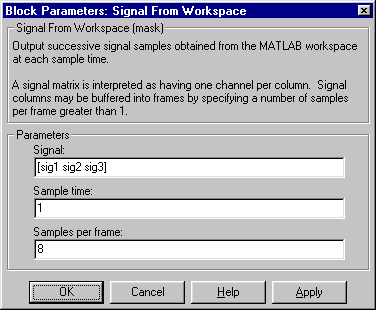
- Double-click on the Signal From Workspace block and enter
[sig1 sig2 sig3]
- for the Signal parameter to define the three channel signal. Then set the
Samples per frame parameter to
8 to establish a frame size of 8 for each
channel.
- 3
- Double-click on the Signal To Workspace block and set the Number of
channels parameter to
3 to match the signal.
- 4
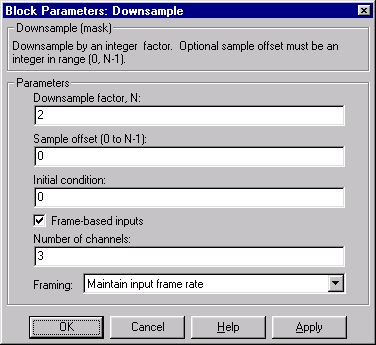
- Double-click on the Downsample block and make the following settings:
- Enter
2 for the Downsample factor parameter.
- Check the Frame-based inputs parameter so that the block will operate
in frame-based mode.
- Set the Number of channels to
3 to match the signal.
- Set the Framing parameter to Maintain input frame rate. This will
allow the block to downsample the signal by adjusting the frame size.
- 5
- Select Vector Line Widths from the Format menu to activate the vector line
width display.
- 6
- Set the Stop time in the Simulation Parameters dialog box to
20, and start
the simulation by selecting Start from the Simulation menu
When the simulation begins running, the model's line widths reveal that the matrix output of the Downsample block contains half the number of elements of the input (12 vs. 24), as expected for decimation by a factor of two. Check the output, yout, to verify that the block independently downsamples each channel over time:
yout =
     0     0     0
     0     0     0
     0     0     0
     0     0     0
     1     0    -1
     3     0    -3
     5     0    -5
     7     0    -7
     9     0    -9
    11     0   -11
    13     0   -13
    15     0   -15
After the first few samples of delay, you can see that each channel is downsampled by a factor of two; every other sample has been removed. The four-sample delay (zeros) at the start of the sequence reflects the latency inherent in frame-based models. See "Benefits of Frame-Based Processing" for more information.
[ Previous | Help Desk | Next ]