| DSP Blockset | Search Help Desk |
Rate Conversion
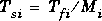
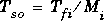
In a DSP Blockset model, there are two types of periods that you will commonly be concerned with: frame periods and sample periods. The sample periods of block inputs and outputs are related to their respective frame periods by


Direct rate conversions, such as upsampling and downsampling, are a feature of most DSP systems, and can be implemented by altering either the frame rate or the frame size of a signal.
The principal purpose of frame rebuffering is to alter the frame size of a signal, usually to improve simulation throughput. By redistributing the signal samples to frames of a new size, rebuffering usually changes either the sample or frame rate of the signal.
Direct Rate Conversion
Rate conversion blocks accept an input signal at one rate, and output the same signal at a new rate. Several of these blocks contain a Framing parameter offering two options for adjusting the rate of the signal: Mi) but keep the frame rate constant (Tfo = Tfi)
Tfi), but keep the frame size constant (Mo = Mi)
Mi) but keep the frame rate constant (Tfo = Tfi)
Tfi), but keep the frame size constant (Mo = Mi)

| Block |
Library |
| Downsample * |
Signal Operations, in General DSP |
| Dyadic Analysis Filter Bank |
Multirate Filters, in Filtering |
| Dyadic Synthesis Filter Bank |
Multirate Filters, in Filtering |
| FIR Decimation * |
Multirate Filters, in Filtering |
| FIR Interpolation * |
Multirate Filters, in Filtering |
| FIR Rate Conversion |
Multirate Filters, in Filtering |
| Repeat * |
Signal Operations, in General DSP |
| Upsample * |
Signal Operations, in General DSP |
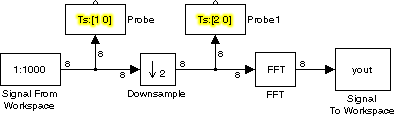
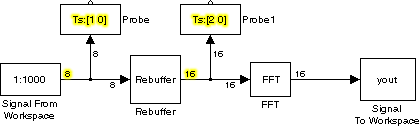
The sample period and frame size of the original signal are set to 0.125 seconds and 8 samples per frame, respectively, by the Sample time and Samples per frame parameters in the Signal From Workspace block. This results in a frame period of 1 second (0.125*8), as shown by the first Probe block.
The Downsample block is configured to downsample the signal by changing the frame rate rather than the frame size. The dialog box with this setting is shown below.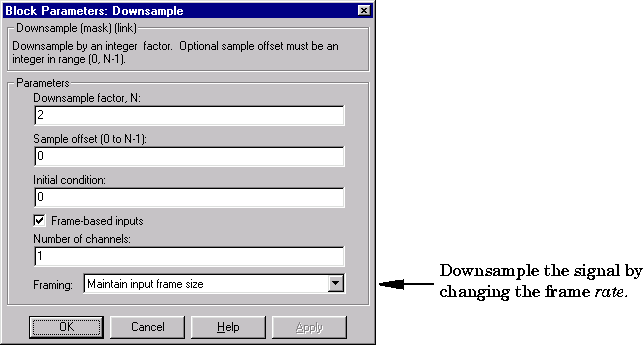
The second Probe block in the model verifies that the output from the Downsample block has a frame period of 2, twice that of the input (half the rate). As a result, the sequence sample period is doubled to 0.25 seconds without any change to the frame size.
Example: Rate Conversion by Frame-Size Adjustment. The same model is shown again below, but this time with the rate conversion implemented by adjusting the frame size, rather than the frame rate.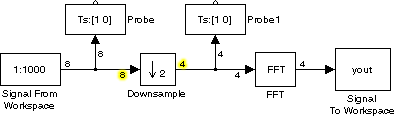
As before, the frame period of the original signal is 1 second (0.125*8), shown by the first Probe block. Now the Downsample block is configured to downsample the signal by changing the frame size rather than the frame rate. The dialog box with this setting is shown below.
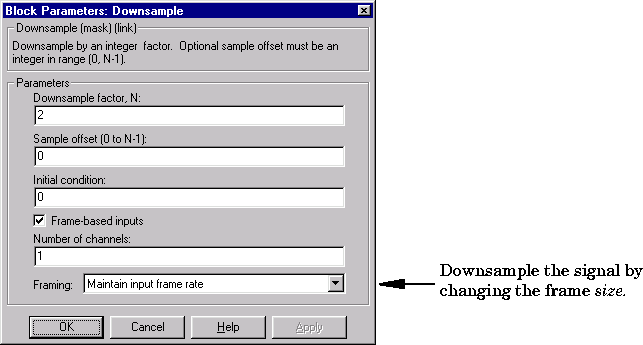
The line width display on the Downsample output port verifies that the downsampled output has a frame size of 4, half that of the input. As a result, the sequence sample period is doubled to 0.25 seconds without any change to the frame rate.
Frame Rebuffering
Buffering operations are another common cause of rate changes in DSP models. The purpose of many buffering operations is to adjust the frame size of the signal without altering the sequence sample rate, in essence changing M while holding Ts fixed. Usually, this type of buffering operation results in a change to the signal's frame rate, Tf, according to the relation
| Block |
Library |
| Buffer |
Buffers, in General DSP |
| Partial Unbuffer |
Buffers, in General DSP |
| Rebuffer |
Buffers, in General DSP |
| Shift Register |
Buffers, in General DSP |
| Unbuffer |
Buffers, in General DSP |
| Variable Selector |
Elementary Functions, in Math Functions |
| Zero Pad |
Signal Operations, in General DSP |
0. The output frame periods, Tfo, of the two blocks are
Buffer block:


Buffering with Alteration of the Signal. Other forms of buffering alter the signal's data or sample period, in addition to adjusting the frame size. There are many instances when this type of buffering is desirable. Examples are creating sliding windows by overlapping consecutive frames of a signal, and selecting a subset of samples from each input frame for processing.
The blocks that alter a signal while adjusting its frame size are listed below. In this list, Tsi is the input sequence sample period, and Tfi and Tfo are the input and output frame periods, respectively.

where Mo is the output frame size specified by the Buffer size parameter. As a result, the new output sample period is
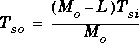
(1:(M1-1)) are eliminated from the beginning of each frame, and samples ((M2+1):end) are eliminated from the end of each frame. The output sample period is related to the input sample period by
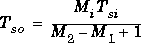
where Mi is the input frame size.


where Mo is the length of the block's output, determined by the indexing vector in the block dialog box.

where Mo is the length of the block's output, determined by the Output frame size parameter in the block dialog box.
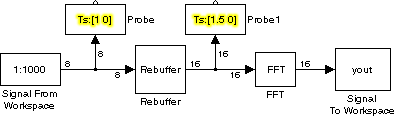
The relation for the output frame period,

Avoiding Unintended Rate Conversions
The previous sections discussed a number of the blocks that are responsible for rate conversions. It is important to be aware of where in a model these rate conversions are taking place; in a few cases, unintentional rate conversions can produce misleading results. The model below provides an example. The model plots the periodogram of a signal composed of two sine waves, with frequencies of 1 Hz and 3 Hz. Both Sine Wave blocks have the following parameter settings:0.1
128
-1. This setting instructs the block to use the input frame size (128) as the FFT length (which is also the output size).
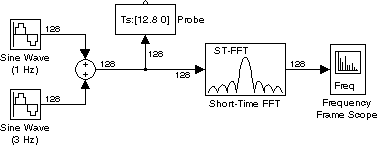
The plot generated by the Frequency Frame Scope is shown below. (The y-axis limits have been adjusted to better display the trace: Minimum Y-limit = -50 and Maximum Y-limit = 20).
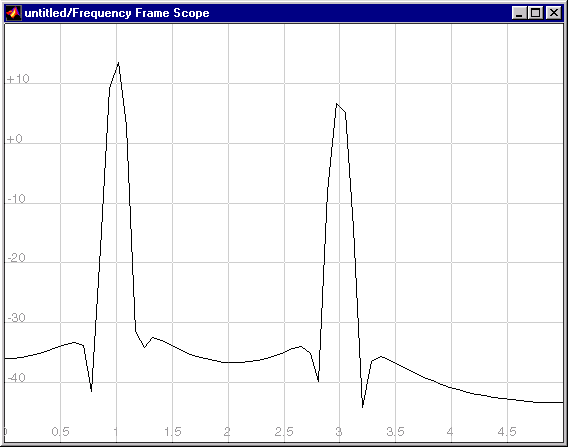
The Frequency Frame Scope uses the input frame size (128) and period (12.8) to deduce the original signal's sample period (0.1), which allows it to correctly display the peaks at 1 Hz and 3 Hz.
Unintended Rate Conversion. In the next case, the Short-Time FFT block uses the default settings for all parameters, including the FFT length setting of256. This setting instructs the block to zero-pad the length-128 input frame to a length of 256 before performing the FFT. The line-width display on the new version of the model shows that the output of the Short-Time FFT block is now a length-256 frame.
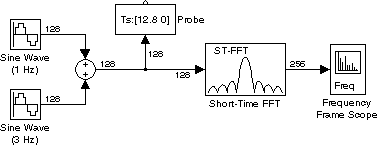
The plot generated by the Frequency Frame Scope is shown below.
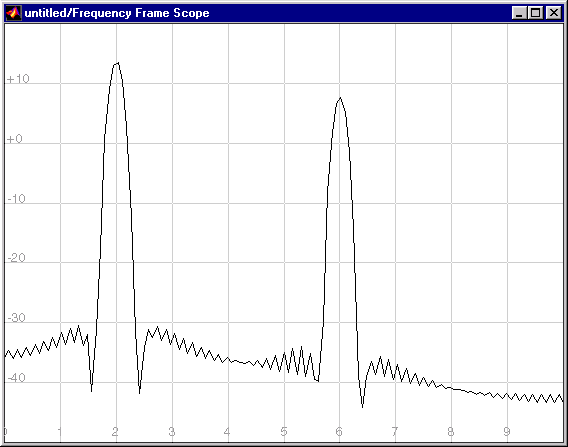
In this case, based on the input frame size (256) and period (12.8), the Frequency Frame Scope calculates the original signal's sample period to be 0.05 seconds (12.8/256), which is wrong. As a result, the spectral peaks appear at the incorrect frequencies, 2 Hz and 6 Hz rather than 1 Hz and 3 Hz.
The problem is that the zero-pad operation performed by the Short-Time FFT block halves the sample period of the sequence by appending 128 zeros to each frame. The Frequency Frame Scope, however, needs to know the sample period of the original signal. The problem is easily solved by changing the Sample time of original time series setting in the Frequency Frame Scope block from-1 (auto-detect) to the actual sample period of 0.1. The plot generated with this setting is identical to the first Frequency Frame Scope plot above.
In general, be aware that when you do zero-padding, overlapping buffering, or partial unbuffering, you are changing the sample period of the signal. As long as you keep this in mind, you should be able to anticipate and correct problems like the one above.