Design and implement a variety of FIR filters.
Library
Filter Designs, in Filtering
Description
The Digital FIR Filter Design block designs a discrete-time (digital) FIR filter in one of several different band configurations using a window method. Most of these filters are designed using the fir1 function in the Signal Processing Toolbox, and are real with linear phase response. The block applies the filter to a discrete-time input using the Direct-Form II Transpose Filter block in the Filter Realizations library.
For complete details on the classical FIR filter design algorithm, see the description of the fir1 and fir2 functions in the Signal Processing Toolbox User's Guide.
Band Configurations
The band configuration for the filter is set from the Filter type pop-up menu. The band configuration parameters below this pop-up menu adapt as appropriate to match the Filter type selection.
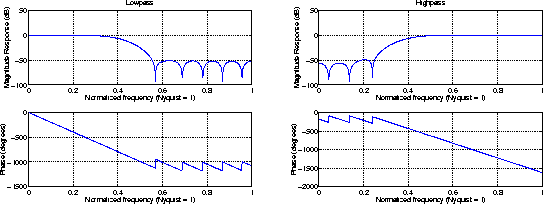
In lowpass and highpass configurations, the Filter order and Upper cutoff frequency parameters specify the filter design. Frequencies are normalized to the Nyquist frequency. The figure below shows the frequency response of the default order-22 filter with cutoff at 0.4.
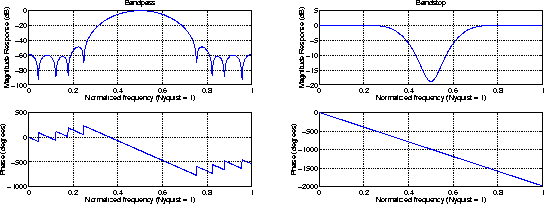
In bandpass and bandstop configurations, the Filter order, Lower cutoff frequency, and Upper cutoff frequency parameters specify the filter design. Frequencies are normalized to the Nyquist frequency, and the actual filter order is twice the Filter order parameter value. The figure below shows the frequency response of the default order-22 filter with lower band edge at 0.4, and upper band edge at 0.6.
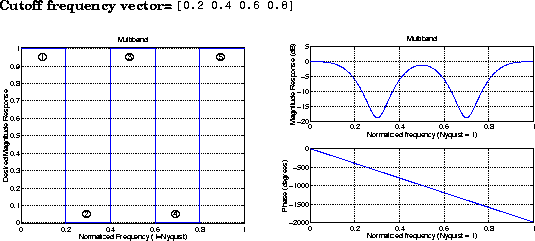
In the multiband configuration, the Filter order, Cutoff frequency vector, and Gain in the first band parameters specify the filter design. The Cutoff frequency vector contains frequency points in the range 0 to 1, where 1 corresponds to the Nyquist frequency. Frequency points must appear in ascending order. The Gain in the first band parameter specifies the gain in the first band: 0 indicates a stopband, and 1 indicates a passband. Additional bands alternate between passband and stopband. The figure below shows the frequency response of the default order-22 filter with five bands, the first a passband.
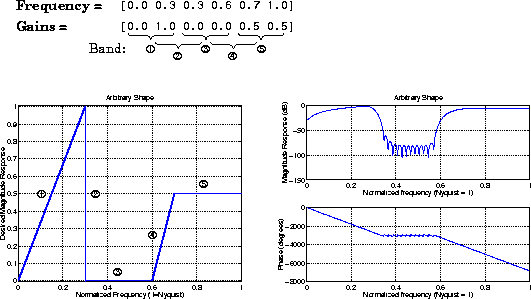
In the arbitrary shape configuration, the Filter order, Frequency vector, and Gains at these frequencies parameters specify the filter design. The Frequency vector, f, contains frequency points in the range 0 to 1 (inclusive) in ascending order, where 1 corresponds to the Nyquist frequency. The Gains at these frequencies parameter, m, is a vector containing the desired magnitude response at the corresponding points in the Frequency vector. (Note that the specifications for the Arbitrary shape configuration are similar to those for the Yule-Walker IIR Filter Design block.)
The desired magnitude response of the design can be displayed by typing
plot(f,m)
Duplicate frequencies can be used to specify a step in the response (such as band 2 below). The figure shows an order-100 filter with five bands.
Arbitrary-shape filters are designed using the fir2 function in the Signal Processing Toolbox.
Window Types
The Window type parameter allows you to select from a variety of different windows. In the list below, Nw is the filter order.
The Frame-based inputs parameter allows you to choose between sample-based and frame-based operation.
Sample-Based Operation
When the check box is not selected (default), the block assumes that the input is a 1-by-N sample vector or M-by-N sample matrix. Each of the N vector elements (or M*N matrix elements) is treated as an independent channel, and the block filters each channel over time.
Frame-Based Operation
When the Frame-based inputs check box is selected, the block assumes that the input is an M-by-N frame matrix. Each of the N frames in the matrix contains M sequential time samples from an independent signal. The Number of channels parameter specifies the number of independent channels in the matrix, N, and the block filters each channel independently over time. Frame-based operation provides substantial increases in throughput rates, at the expense of greater model latency.
In both sample-based and frame-based modes, the output is the same size as the input.
Dialog Box
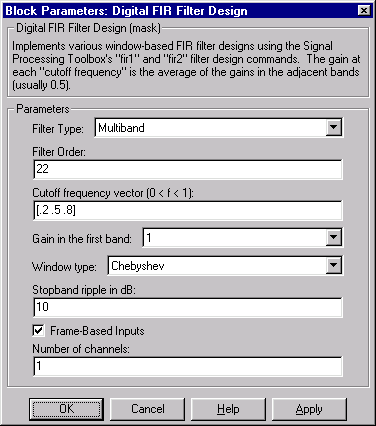
The parameters displayed in the dialog box vary for different filter types. Not all of the parameters shown above (and listed below) are visible in the dialog box at any one time.
- Filter type
- The type of filter to design: Lowpass, Highpass, Bandpass, Bandstop, Multiband, or Arbitrary Shape.
- Filter order
- The order of the filter. The filter length is one more than this value. For the Bandpass and Bandstop configurations, the order of the final filter is twice this value.
- Upper cutoff frequency
- The normalized cutoff frequency for the Highpass and Lowpass filter configurations. A value of
1 specifies the Nyquist frequency (half the sample frequency).
- Lower cutoff frequency
- The lower passband or stopband frequency for the Bandpass and Bandstop filter configurations. A value of
1 specifies the Nyquist frequency (half the sample frequency).
- Upper cutoff frequency
- The upper passband or stopband frequency for the Bandpass and Bandstop filters. A value of
1 specifies the Nyquist frequency (half the sample frequency).
- Cutoff frequency vector
- A vector of ascending frequency points defining the cutoff edges for the Multiband filter. A value of
1 specifies the Nyquist frequency (half the sample frequency).
- Gain in the first band
- The gain in the first band of the Multiband filter:
0 specifies a stopband, 1 specifies a passband. Additional bands alternate between passband and stopband.
- Frequency vector
- A vector of ascending frequency points defining the frequency bands of the Arbitrary shape filter. The frequency range is
0 to 1 including the endpoints, where 1 corresponds to the Nyquist frequency (half the sample frequency).
- Gains at these frequencies
- A vector containing the desired magnitude response for the Arbitrary shape filter at the corresponding points in the Frequency vector.
- Window type
- The type of window to apply.
- Stopband ripple
- The level (dB) of stopband ripple, Rs, for the Chebyshev window.
- Beta
- The Kaiser window
 parameter. Increasing Beta widens the mainlobe and decreases the amplitude of the window sidelobes in the window's frequency magnitude response.
- Frame-based inputs
- Selects frame-based operation.
- Number of channels
- For frame-based operation, the number of columns (channels) in the input matrix.
References
Antoniou, A. Digital Filters: Analysis, Design, and Applications. 2nd ed. New York, NY: McGraw-Hill, 1993.
Oppenheim, A. V. and R. W. Schafer. Discrete-Time Signal Processing. Englewood Cliffs, NJ: Prentice Hall, 1989.
Proakis, J. and D. Manolakis. Digital Signal Processing. 3rd ed. Englewood Cliffs, NJ: Prentice-Hall, 1996.
See Also
Digital IIR Filter Design
Least Squares FIR Filter Design
Remez FIR Filter Design
Window Function
Yule-Walker IIR Filter Design
fir1 (Signal Processing Toolbox)
fir2 (Signal Processing Toolbox)
[ Previous | Help Desk | Next ]