Generate the sum of inputs.
Library
Math
Description
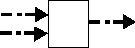
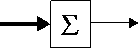
The Sum block adds scalar and/or vector inputs, or elements of a single vector input, depending on the number of block inputs:
This model represents using the Sum block in this way. The broken lines indicate that each signal can be a scalar or vector. The output is a scalar only if all inputs are scalars.
This model represents using the Sum block in this way. The solid line input signal indicates that the input is a vector.
Note
Simulink hides the name of a Sum block when you copy it from the Simulink block library to a model.
Data Type Support
The Sum block accepts real- or complex-valued signals of any data type. All the inputs must be of the same data type. The output data type is the same as the input data type.
Parameters and Dialog Box
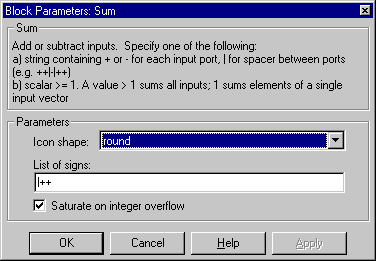
- Icon shape
- You can choose a circular or rectangular shape for the Sum block in the Icon shape drop box. If the Sum block has multiple inputs, it may be more convenient to have a circular shape than a rectangular shape.
- List of signs
- The List of signs parameter can have a constant or a combination of +, -, and | symbols. Specifying a constant causes Simulink to redraw the block with that number of ports, all with positive polarity. A combination of plus and minus signs specifies the polarity of each port, where the number of ports equals the number of symbols used.
- The Sum block draws plus and minus signs beside the appropriate ports and redraws its ports to match the number of signs specified in the List of signs parameter. If the number of signs is changed, ports are added or deleted from the icon. If necessary, Simulink resizes the block to show all input ports. You can also manipulate the position of the input ports by inserting spacers (|) between the signs in the List of signs parameter. The spacers create extra space between the ports. For example, ++|-- will create an extra space between the second + port and the first - port:
- Saturate on integer overflow
- If selected, this option causes the output of the Sum block to saturate on integer overflow. In particular, if the output data type is an integer type, the block output is the maximum value representable by the output type or the computed output, whichever is smaller in the absolute sense. If the option is not selected, Simulink takes the action specified by Data overflow event option on the Diagnostics page of the Simulation Parameters dialog (see "The Diagnostics Page").
Characteristics
Direct Feedthrough
|
Yes
|
Sample Time
|
Inherited from driving blocks
|
Scalar Expansion
|
Yes
|
States
|
0
|
Vectorized
|
Yes
|
Zero Crossing
|
No
|
[ Previous | Help Desk | Next ]