Classical IIR and FIR Filters, Discrete Time
The Digital FIR Filter Design and Digital IIR Filter Design blocks design and implement discrete-time filters with standard band configurations.
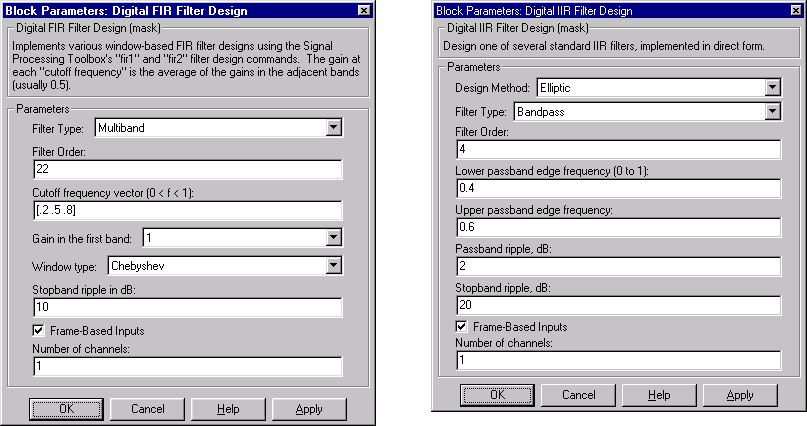
All of the digital filter designs let you specify a filter order. The other available parameters depend on the Filter type and band configuration, as shown below, where fn0 = cutoff frequency, fn1 = lower cutoff frequency, fn2 = upper cutoff frequency, Rp = passband ripple in decibels, and Rs = stopband attenuation in decibels.
Configuration
|
FIR
|
Butterworth
|
Chebyshev I
|
Chebyshev II
|
Elliptic
|
Lowpass
|
fn0
|
fn0
|
fn0, Rp
|
fn0, Rs
|
fn0, Rp, Rs
|
Highpass
|
fn0
|
fn0
|
fn0, Rp
|
fn0, Rs
|
fn0, Rp, Rs
|
Bandpass
|
fn1, fn2
|
fn1, fn2
|
fn1, fn2, Rp
|
fn1, fn2, Rs
|
fn1, fn2, Rp, Rs
|
Bandstop
|
fn1, fn2
|
fn1, fn2
|
fn1, fn2, Rp
|
fn1, fn2, Rs
|
fn1, fn2, Rp, Rs
|
For all of the classical discrete-time filter design blocks, frequency parameters use normalized units. The unit frequency is the Nyquist frequency (half the sample frequency), so the band edge frequencies are always in the range [0 1].
The Digital IIR Filter Design block uses a direct-form II transposed representation. It inherits its sample rate from the driving block, and accepts only discrete-time inputs.
Both of these blocks use Signal Processing Toolbox functions to design the filter:
For more information on the filter design algorithms, see the Signal Processing Toolbox User's Guide.
Example: Chebyshev Type II Lowpass Filter
Create a model like the one shown below. The model generates a signal composed of two sine waves at different frequencies, and then removes the higher frequency component with a lowpass filter.
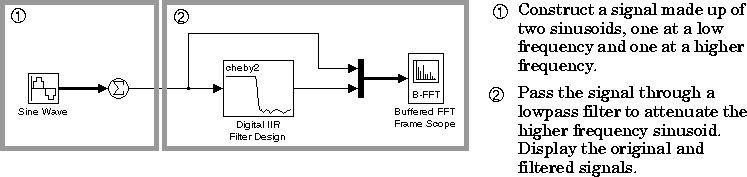
Construct the model using:
To try the model:
- 1
- Create a signal made up of two sinusoids (at 100 Hz and 400 Hz) by entering
a two-element vector in the Frequency field of the Sine Wave block:
- Amplitude =
10
- Frequency =
[100 400]
- Phase =
0
- Sample time =
0.001
- Samples per frame =
1
- 2
- Set the Sum block's List of signs parameter to
1.
- 3
- Verify that the Buffered FFT Frame Scope block is set to inherit the sample
period of the input, and to plot two channels of data:
- Sample time of original time series =
-1
- Number of input channels =
2
- 4
- In the Digital IIR Filter Design dialog, specify a Chebyshev type II lowpass
filter with a Stopband edge frequency of 250 Hz, to attenuate the sinusoid
at 400 Hz but retain the sinusoid at 100 Hz. Note that the Nyquist frequency
in this case is 500 Hz (half the sample frequency), so that the normalized
Stopband edge frequency is
0.5.
- Select Chebyshev II from Design Method.
- Select Lowpass from Filter Type.
- Filter Order =
8
- Stopband edge frequency =
0.5
- Stopband ripple =
20
- 5
- Set the Stop time in the Parameters dialog box to
inf, and start the
simulation by selecting Start from the Simulation menu.
- 6
- As the simulation begins running, right-click in the plot area of the scope,
and select Autoscale from the pop-up menu. You can also change the styles
and colors of the plotted lines by selecting either CH 1 or CH 2 from the
right-click pop-up menu.
The Buffered FFT Frame Scope window displays both the original signal and the filtered result, which shows the expected attenuation of the 400 Hz component. Stop the simulation at any time by selecting Stop from the Simulation menu.
[ Previous | Help Desk | Next ]