

-1 to auto-detect the signal sample period from the sample period of the block input.


| DSP Blockset | Search Help Desk |
| Buffered FFT Frame Scope | See Also |
Compute and display the frequency content of an input sequence.
Library
DSP SinksDescription
The Buffered FFT Frame Scope block acquires a sequence of input samples into a buffer, and displays the magnitude of the FFT of each full buffer. The block assumes that the input is a 1-by-N sample vector or M-by-N sample matrix. Each of the N vector elements (or M*N matrix elements) is treated as an independent channel, and the block buffers and displays the data in each channel independently. The number of input samples that the block buffers before computing and displaying the magnitude FFT is specified by the Buffer size (Mo) parameter. The Buffer overlap (L) parameter specifies the number of samples from the previous buffer to include in the current buffer. The number of new input samples the block acquires before computing and displaying the magnitude FFT is the difference between the Buffer size and Buffer overlap, Mo-L. The display update period is (Mo-L)*Ts, where Ts is the input sample period, and is equal to the input sample period when the Buffer overlap is Mo-1. For negative Buffer overlap values, the block simply discards the appropriate number of input samples after the buffer fills, and updates the scope display at a slower rate than the zero-overlap case. The FFT length parameter, Nfft, specifies the number of samples on which to perform the FFT. A value of-1 instructs the block to use the buffer size as the FFT size. Otherwise, the block zero pads or truncates every channel's buffer to Nfft before computing the FFT.
In order to correctly scale the frequency axis (i.e., to determine the frequencies against which the transformed input data should be plotted), the block needs to know the actual sample period of the time-domain input. The Sample time of original time-series parameter allows you to specify this in two different ways:
Auto-Detect from Input Sample Period.
A value of -1 for this parameter instructs the block to compute the frequency data from the sample period of the input to the block. This parameter setting is appropriate when the input to the block is the original signal, with no samples added or deleted (by insertion of zeros, for example).
The auto-detect mode also makes the assumption that the sample period of the original time-domain signal in the simulation is equal to the period with which the physical signal was originally sampled. For example, the mtlb signal imported from the workspace in the model below has an actual sample period of 1/Fs = 1/7418.
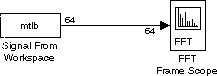 Although the Sample time parameter in the Signal From Workspace block can legitimately be set to any value, for the auto-detect mode to compute the correct frequency scaling, the Sample time parameter must be set to the "real-world" sample period of
 1/7418.
Enter the Appropriate Time-Domain Sample Period.
Enter the sample period of the original time-series, Ts. This is necessary only when the input to the block is not the original signal, but a zero-padded or otherwise rate-altered version.
The Frequency units parameter specifies whether the frequency axis values should be in units of Hertz or rads/sec, and the Frequency range parameter specifies the range of frequencies over which the magnitudes in the input should be plotted. The available options are [0..Fs/2], [-Fs/2..Fs/2], and [0..Fs], where Fs is the time-domain signal's actual sample frequency (Fs/2 is the Nyquist frequency). If the Frequency units parameter specifies Hertz, the spacing between frequency points is 1/(NfftTs). For Frequency units of rads/sec, the spacing between frequency points is 2 /(NfftTs).
Note that all of the FFT-based blocks in the DSP Blockset, including those in the Power Spectrum Estimation library, compute the FFT at frequencies in the range [0,Fs). The Frequency range parameter controls only the displayed range of the signal.
For information about the scope window, as well as the Axis properties and Line properties panels in the dialog box, see the reference page for the Time Frame Scope block.
/(NfftTs).
Note that all of the FFT-based blocks in the DSP Blockset, including those in the Power Spectrum Estimation library, compute the FFT at frequencies in the range [0,Fs). The Frequency range parameter controls only the displayed range of the signal.
For information about the scope window, as well as the Axis properties and Line properties panels in the dialog box, see the reference page for the Time Frame Scope block.
Dialog Box
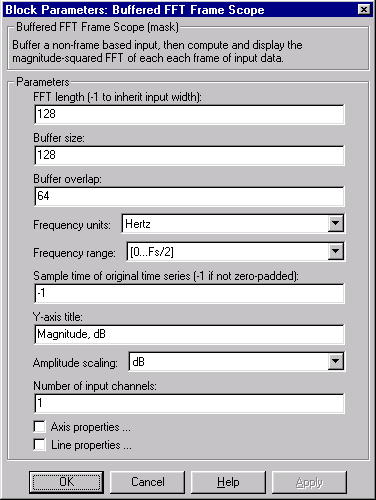
-1 to auto-detect the signal sample period from the sample period of the block input.See Also
FFT