| DSP Blockset | Search Help Desk |
Exporting Data to the Workspace
There are four blocks in the DSP Sinks library that export data to the workspace from a Simulink model: The triggered sink blocks work the same as their nontriggered counterparts, but only sample the input when a specified trigger signal is received, instead of at a regular sample interval. See Chapter 4, "DSP Block Reference," for detailed information about each of the triggered sink blocks.Signal To Workspace
The Signal To Workspace is the counterpart of the Signal From Workspace block as the primary method of exporting sample-based and frame-based sequences to the workspace. The Variable name parameter allows you to specify the name of a workspace vector or matrix in which to store the data. Existing workspace variables with the specified name are overwritten. The Frame-based parameter toggles the block between sample-based and frame-based processing. In sample-based mode (Frame-based unchecked), the block treats inputs as sample vectors or sample matrices; each vector or matrix input is written to a unique row of the workspace matrix. In frame-based mode (Frame-based checked), the block treats inputs as frame vectors and frame matrices, and appends each successive input to the workspace matrix. In other words, the Signal To Workspace block pastes successive frames together to recreate the original signal.Matrix To Workspace
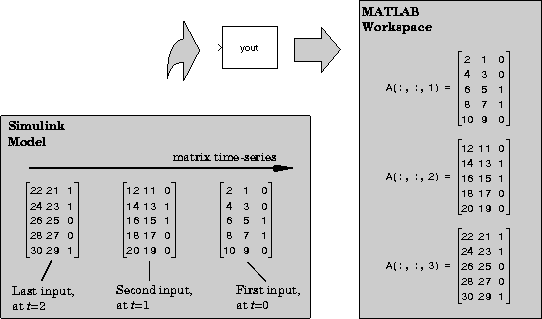
The Matrix To Workspace block writes a three-dimensional array,A, to the workspace, where A contains the acquired samples of a matrix input. At the end of the simulation the block writes every Dth input (a matrix) to a page (a two-dimensional slice) of the specified three-dimensional workspace array, where D is specified by the block's Decimation factor parameter. The first input is written to the first page of the array, A(:,:,1), and the block continues adding pages to the array until it writes the last input matrix to the last page, A(:,:,end).