| DSP Blockset | Search Help Desk |
Importing Data from the Workspace
The MATLAB workspace provides a convenient storage facility for data of all kinds. Although Simulink and the DSP Blockset provide a number of basic signal generators (e.g., Sine Wave, Discrete Constant, Signal Generator, Chirp), more complex signals, such as speech or sensor telemetry, are usually read into Simulink from the MATLAB workspace. A single-channel signal is represented in the workspace as either a row-vector or column-vector. For example, the vectors belowu = 1:1000 % a row-vector u = (1:1000)' % a column-vectorare both one-channel signals. A multichannel signal is represented as an M-by-N matrix, with each column a separate channel. For example, the commands
load mtlb
u = [mtlb flipud(mtlb) zeros(size(mtlb))]
create a three-channel signal, the first few samples of which are shown below.
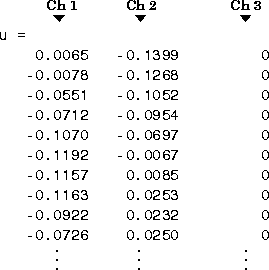
Channel 1 (the first column) contains the familiar mtlb speech signal. Channel 2 contains a flipped copy of the mtlb signal, and Channel 3 contains zeros. The three samples in each row are considered to correspond to the same instant in time; that is, each row is a sample vector.
Signal From Workspace
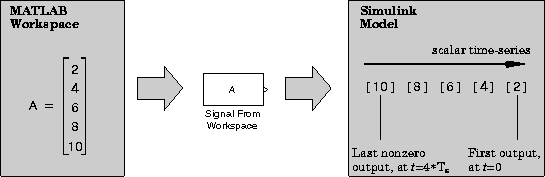
The Signal From Workspace block imports signal data from the workspace to output in the simulation as a sample-based or frame-based sequence. The Signal parameter allows you to specify the name of an existing vector or matrix in the workspace, or to directly enter a MATLAB expression defining the signal. The Samples per frame parameter specifies the number of consecutive signal samples from each channel to be included in each output frame. Workspace Vector. When the signal in the workspace is a vector (one channel), a Samples per frame parameter value of1 creates a scalar output, releasing the vector elements into the simulation one-by-one. The sample period of the scalar sequence, Ts, is specified by the Sample time parameter.
The figure below illustrates this process for a vector, A, in the workspace. The Sample time parameter value is 1. After the last vector element is output (if the simulation runs that long), the block outputs zeros for the remainder of the simulation.
For a Samples per frame parameter value of M (M>1), the block creates a frame-based output by acquiring M consecutive vector elements before releasing the resulting frame into the simulation. The sample period of the sequence contained in the output frames, Ts, is again specified by the Sample time parameter. The output frame period, Tfo, is M*Ts.
The figure below illustrates the same single-channel signal (Ts = 1) being output with a frame size of 2.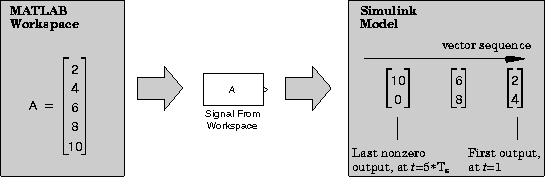
Workspace Matrix .
When the signal in the workspace is a matrix (multiple channels), setting the Samples per frame parameter to 1 creates a length-N sample vector output, releasing the matrix rows into the simulation one-by-one. The sample period of the vector sequence, Tsi, is specified by the Sample time parameter.
Triggered Signal From Workspace
The Triggered Signal From Workspace block is identical to the Signal From Workspace block, but only acquires samples from the workspace when triggered by a control signal.Matrix From Workspace
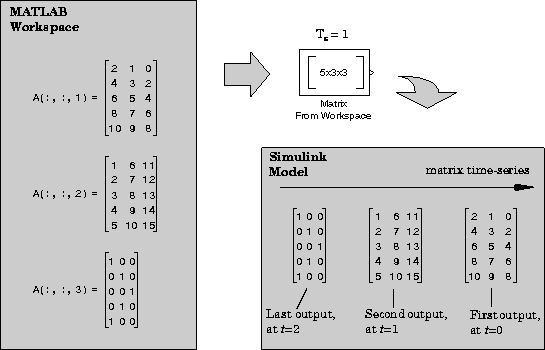
The Matrix From Workspace block references a three-dimensional array in the workspace,A, to generate a matrix output to the system. At each sample time, the block outputs a page (a two-dimensional slice) of the three-dimensional array, beginning with the first, A(:,:,1), at t=0. The block continues to output pages of the array until it outputs the last page, A(:,:,end).