Model the dynamics of a three-phase salient-pole synchronous machine
Library
Machines Library
Description
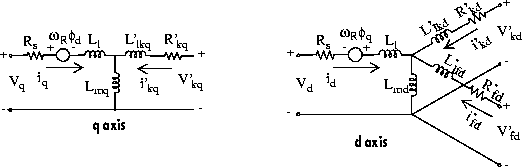
The Synchronous Machine block operates in generating or motoring modes. The operating mode is dictated by the sign of the mechanical power (positive for generating, negative for motoring). The electrical part of the machine is represented by a fifth-order state-space model and the mechanical part is the same as in the Simplified Alternator block.
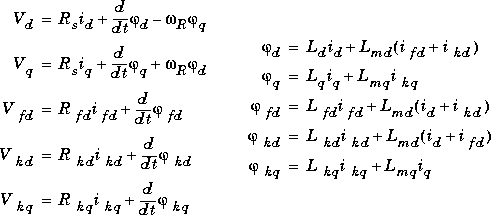
The model takes into account the dynamics of the stator, field, and damper windings. The equivalent circuit of the model is represented in the rotor reference frame (qd frame). All rotor parameters and electrical quantities are viewed from the stator. They are identified by primed variables. The subscripts used are defined as follows:
Parameters and Dialog Boxes
In the powerlib library, you can choose between three Synchronous Machine blocks to specify the parameters of the model.
Fundamental Parameters in SI Units
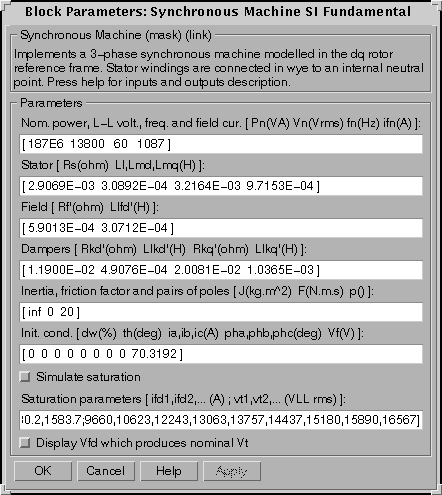
The first line of this dialog box is where you specify the nominal parameters:
The nominal field current is the current that produces nominal terminal voltage under no-load conditions. This model was developed with all quantities viewed from the stator. The nominal field current makes it possible to compute the transformation ratio of the machine, which allows you to apply the field voltage viewed from the rotor, as in reality. This also allows the field current, which is a variable in the output vector of the model, to be viewed from the rotor. If the value of the nominal field current is not known, you must enter zero. Since the transformation ratio cannot be determined in this case, you will have to apply the field voltage as viewed from the stator and the field current in the output vector will also be viewed from the stator.
You specify the following stator parameters on the second line of the dialog box:
You specify the field parameters next, on the third line:
The fourth line consists of the damper parameters:
The fifth line contains the mechanical parameters:
You enter the initial conditions (9) for the model on the sixth line:
You can specify the initial field voltage in one of two ways. If you know the nominal field current (first line, last parameter) enter in the dialog box the initial field voltage in Volts DC viewed from the rotor. Otherwise, enter a zero as nominal field current, and specify the initial field voltage in Volts AC rms phase-to-phase viewed from the stator. The nominal field voltage viewed from the stator can be easily determined by checking the "Display Vfd which produces a nominal Vt" checkbox at the bottom of the dialog box. You can also determine the nominal field voltage viewed from the stator with a no-load test as follows:
Finally, you can optionally specify saturation parameters for the Synchronous Machine to model magnetic saturation of the rotor and stator iron. Saturation is modeled by a nonlinear function, in this case a polynomial, using points on the no-load saturation curve. To simulate saturation, you must enter a 2 by n matrix, where n is the number of points taken from the saturation curve. The first row of this matrix contains the values of field currents while the second row contains values of corresponding terminal voltages. The first point (first column of the matrix) must correspond to the point where the effect of saturation begins. You must also check the Simulate saturation checkbox to simulate saturation. This checkbox allows you to enter the matrix of parameters for simulating the saturation. In simulations where you don't simulate saturation, simply uncheck the box. You can later simulate saturation by checking the box without having to re-enter the entire matrix.
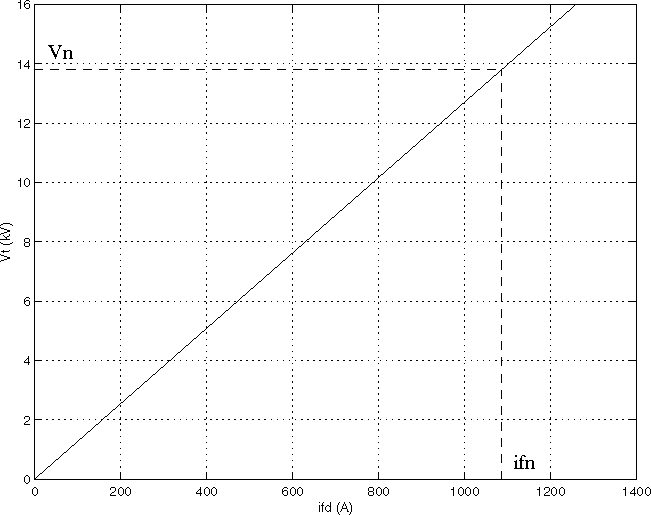
In this case the relationship between ifd and Vt obtained is linear (no saturation).
As an example, without saturation, a typical curve might be as shown.
Here ifn is 1087A and Vn is 13800 V line-to-line, which is also 11268 V peak line-to-neutral.
When saturation is modeled, a polynomial is fitted to the curve corresponding to the matrix of points you enter. The more points you enter, the better the fit to the original curve. The next figure illustrates this graphically (the diamonds are the actual points entered in the dialog box).
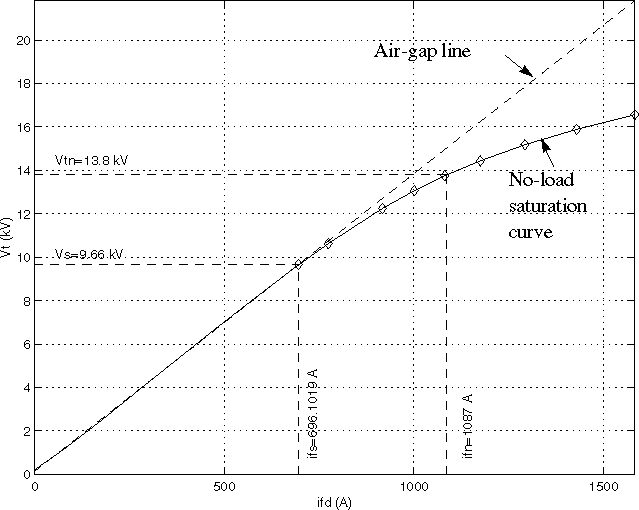
In this particular case, the following values were used:
- ifn = 1087 A
- ifd = [695.64, 774.7, 917.5, 1001.6, 1082.2, 1175.9, 1293.6, 1430.2, 1583.7] A
- Vt = [9660, 10623, 12243, 13063, 13757, 14437, 15180, 15890, 16567] V
Fundamental Parameters in pu
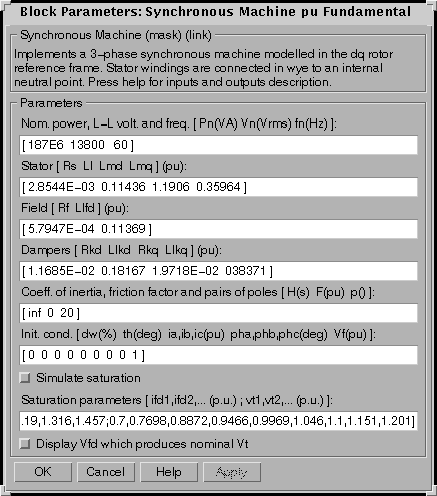
The first line of this dialog box is where you specify the nominal parameters:
This line is identical to the first line of the fundamental parameters in SI dialog box, except that you don't specify a nominal field current. This value is not required here because we don't need the transformation ratio. Since rotor quantities are viewed from the stator, they are converted to pu using the stator base quantities derived from the three nominal parameters above.
The second, third and fourth line contain exactly the same parameters as in the previous dialog box (stator, field and dampers), but they are expressed here in pu instead of SI units.
The fifth line contains the mechanical parameters, but expressed in pu:
The sixth line contains the initial conditions, as before, but the initial line currents and field voltage are expressed in pu instead of SI units.
The last line is where you specify the Saturation parameters, as before. However, the parameters must now be entered in per unit using the nominal field current, multiplied by the d axis mutual inductance, and nominal rms line-to-line voltage as base values for the field current, and terminal voltage, respectively.
Standard Parameters in pu
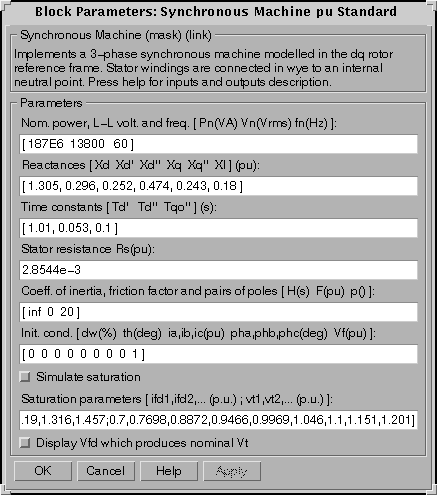
The first line of this dialog box is identical to the first line of the fundamental parameters in pu dialog box and contains nominal parameters.
You specify the machine's reactances on the second line (all in pu):
The third line contains the machine's time constants (all in s):
The fourth line is where you enter the stator resistance Rs, in pu
The last three lines are identical to the previous fundamental parameters in pu dialog box and consist of mechanical parameters, initial conditions and saturation parameters.
Note: These three blocks simulate exactly the same Synchronous machine model, the only difference is the way of entering the parameter units.
Inputs and Outputs
The units of inputs and outputs will vary according to which dialog box was used to enter the block parameters. For the non-electrical connections, there are two possibilities. If the first dialog box (fundamental parameters in SI units) is used, the inputs and outputs are in SI units (except for dw in the vector of internal variables, which is always in pu, and angle  , which is always in degrees). If the second or third dialog boxes are used, the inputs and outputs are in pu.
The first input is the mechanical power at the machine's shaft. In the generating mode, this input can be a positive constant or function or the output of a prime mover block (see the Hydraulic Turbine and Governor block). In the motoring mode, this input is usually a negative constant or function.
The second input of the block is the field voltage which can be supplied by a voltage regulator (see the Excitation System block) in the generating mode and is usually a constant in the motoring mode.
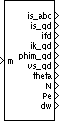
The first three outputs are the electrical terminals of the stator. The last output of the block is a vector containing 16 variables. They are, in order:
These variables can be demultiplexed by using the special Synchronous Machine Demux block provided in the Machine library.
, which is always in degrees). If the second or third dialog boxes are used, the inputs and outputs are in pu.
The first input is the mechanical power at the machine's shaft. In the generating mode, this input can be a positive constant or function or the output of a prime mover block (see the Hydraulic Turbine and Governor block). In the motoring mode, this input is usually a negative constant or function.
The second input of the block is the field voltage which can be supplied by a voltage regulator (see the Excitation System block) in the generating mode and is usually a constant in the motoring mode.
The first three outputs are the electrical terminals of the stator. The last output of the block is a vector containing 16 variables. They are, in order:
These variables can be demultiplexed by using the special Synchronous Machine Demux block provided in the Machine library.
Example
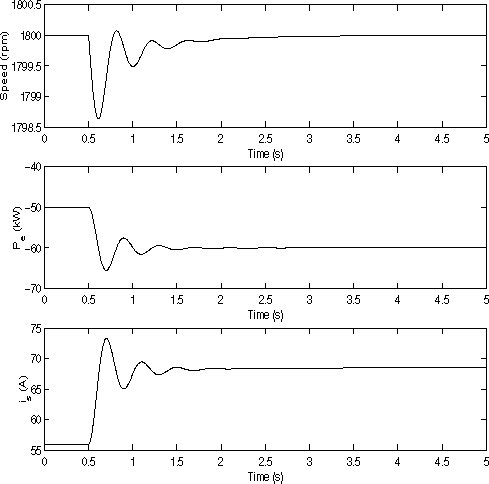
This example, available in the psbsyncmachine.mdl file, illustrates the use of the Synchronous Machine in motoring mode. The simulated system consists of an industrial grade synchronous motor (150 HP, 440V) connected to an infinite bus. After the machine reaches a stable speed, the load (mechanical power) is changed from 50 kW to 60 kW. The initial conditions are set in such a way that the simulation starts in steady-state. Open the simulink diagram by typing psbsyncmachine.
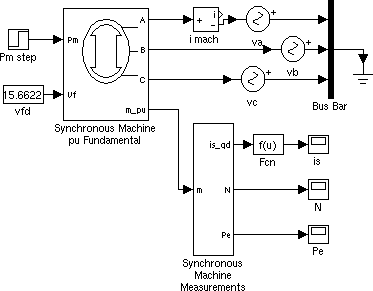
Set the Simulation parameters as follows:
Because this is a four pole machine, the nominal speed is 1800 rpm. The initial speed is 1800 rpm as prescribed (top graph). The load passes from 50 kW to 60 kW at t=0.5 s. The machine then oscillates before stabilizing to 1800 rpm.
Now, look at the electrical power (middle graph). Since we are in motoring mode, the machine absorbs power and Pe is negative. As expected, the power starts at -50 kW until the load is changed at t=0.5 seconds, at which point the power oscillates before settling at -60 kW.
Finally, look at the stator current is. As expected, the current starts with the value corresponding to a three-phase power of 50 kW (56 A), before oscillating and settling to the value corresponding to a 60 kW load (68.5 A).
References
[1] Krause, P.C., Analysis of Electric Machinery, section 12.5, McGraw-Hill, 1986.
[2] Kamwa, I., et al., "Experience with Computer-Aided Graphical Analysis of Sudden-Short-Circuit Oscillograms of Large Synchronous Machines", Vol.10, IEEE Transactions on Energy Conversion, No.3, September 1995.
See Also
Simplified Synchronous Machine, Excitation System, Hydraulic Turbine
and Governor
[ Previous | Help Desk | Next ]