Example: Using Buffer and Unbuffer
The model below demonstrates how to use the Buffer block to create a frame vector that the FFT block can operate on. At the end of the processing flow, the Partial Unbuffer block converts the frame vectors back to scalar samples for output on a Scope.
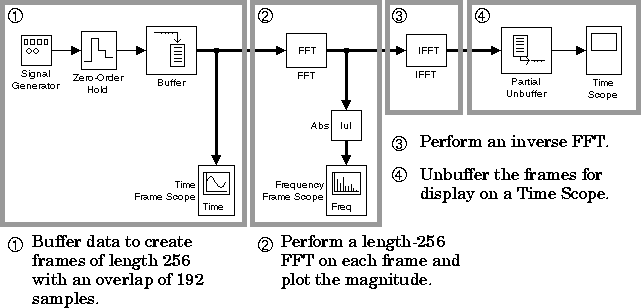
Construct the model using:
To try the model:
- 1
- Set the input signal parameters in the Signal Generator block:
- Wave form = square
- Amplitude =
2
- Frequency =
3.5
- Units = rad/sec
- 2
- Set the Sample time in the Zero-Order Hold block to
0.001.
- 3
- Set the Buffer block parameters:
- Buffer size =
256
- Buffer overlap =
192
- 4
- Set the Partial Unbuffer block parameters:
- Buffer size =
256
- First output index =
193
- Last output index =
256
- 5
- Set the Frequency Frame Scope block parameters:
- Frequency units = rads/sec
- Sample time of vector elements =
0.001
- 6
- Set the Stop time in the Parameters dialog box to
inf, and start the
simulation by selecting Start from the Simulation menu.
The Time Frame Scope window displays the buffered input, and the Frequency Frame Scope window displays its FFT. Stop the simulation at any time by selecting Stop from the Simulation menu.
[ Previous | Help Desk | Next ]