Example: Convolution
The model below convolves a length-128 Hamming window with successive nonoverlapping, 128-sample buffers containing samples generated by the Sine Wave block. The Time Frame Scope window opens automatically and displays the output.
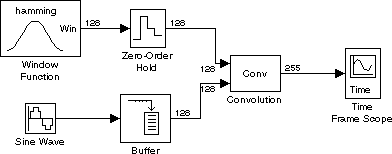
Construct the model using:
To try the model:
- 1
- Set the Window Function block parameters to generate a length-128
Hamming window.
- Select Generate window from the Operation pop-up menu.
- Select Hamming from the Window Type pop-up menu.
- Enter
128 for Window length.
- 2
- Set the Sample time parameter of the Sine Wave block to
0.001.
- 3
- Set the Sample time parameter of the Zero-Order Hold block to
0.001*128.
This matches the output frame period to the output frame period of the
Buffer block.
- 4
- Set the Buffer size parameter of the Buffer block to
128.
- 5
- In the Time Frame Scope block dialog box, click the Axis properties check
box to expose the axis properties panel. Set the following parameter values:
- Minimum Y-limit =
-75
- Maximum Y-limit =
75
- 6
- Set the Stop time to
inf in the Parameters dialog box (from the Simulation
menu) and start the simulation by selecting Start from the Simulation
menu.
- The Time Frame Scope window displays the result of the convolution. For
input vectors of length Mu and Mv, the Convolution block outputs a vector of
length Mu+Mv-1. Here, each result has length 255.
- 7
- Stop the simulation at any time by selecting Stop from the Simulation
menu.
Try changing some characteristics of the model. For example, use a different windowing function, or change the Window Function block and Buffer block parameters to use frames of length 64.
[ Previous | Help Desk | Next ]