| Using Simulink | Search Help Desk |
Model Properties Dialog
The Model Properties dialog box allows you to edit some version control parameters and set some related options. To display the dialog box, choose Model Parameters from the Simulink File menu.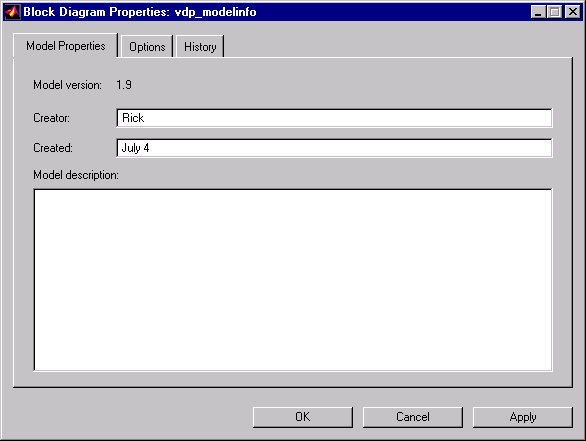
Model Properties Pane
The Model Properties pane lets you edit the following version control parameters. Creator. Name of the person who created this model. Simulink sets this property to the value of the USER environment variable when you create the model. Edit this field to change the value. Created. Date and time this model was created. Model description. Description of the model.Options Pane
The Options pane lets you choose a configuration manager and specify version control information formats.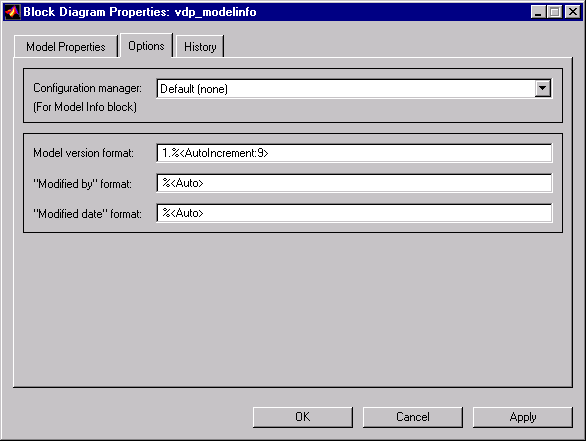
Model Info for more information.
The file cmopts.m in the MATLABROOT/toolbox/local directory specifies the default configuration manager for models. The default "default" configuration manager is none. You can edit this file to specify another choice.
Model version format.
Format used to display the model version number in the Model Parameters pane and in Model Info blocks. The value of this parameter can be any text string. The text string can include occurrences of the tag %<AutoIncrement:#> where # is an integer. Simulink replaces the tag with # when displaying the model's version number. For example, it displays
1.%<AutoIncrement:2>as
1.2Simulink increments # by 1 when saving the model. For example,
1.%<1.%<AutoIncrement:2>becomes
1.%<1.%<AutoIncrement:3>when you save the model. Modified by format. Format used to display the "Modified By" value in the History pane, in the history log, and in Model Info blocks. The value of this field can be any string. The string can include the tag
%<Auto>. Simulink replaces occurrences of this tag with the current value of the USER environment variable.
Modified date format.
Format used to display the "Last modified date" in the History pane, in the history log, and in Model Info blocks. The value of this field can be any string. The string can contain the tag %<Auto>. Simulink replaces occurrences of this tag with the current date and time.
History Pane
The History pane allows you enable, view, and edit this model's change history.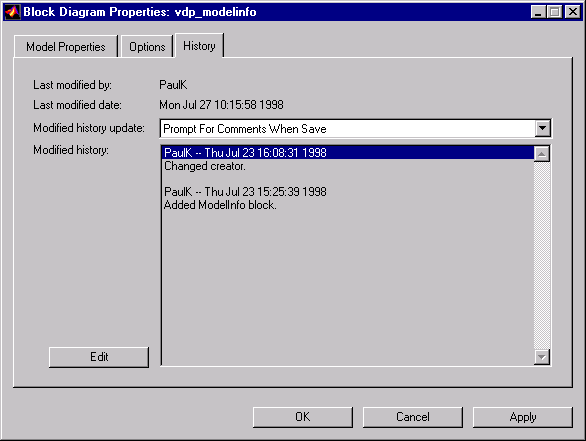
USER environment variable when you save a model. You cannot edit this field.
Last modified date.
Date that this model was last modified. Simulink sets the value of this parameter to the system date and time when you save a model. You cannot edit this field.
Modified history update.
Specifies whether to prompt a user for a comment when this model is saved. If you choose "Prompt for Comments When Save," Simulink prompts you for a comment to store in the model. You would typically use the comment to document any changes you made to the model in the current session. Simulink stores the previous value of this parameter in the model's change history. See "Creating a Model Change History" for more information.
Modified history.
History of modifications of this model. Simulink compiles the history from comments entered by users when they update the model. You can edit the history at any time by selecting the adjacent Edit button.