| Using Simulink | Search Help Desk |
Specifying the Current User
When a user creates or updates a model, Simulink logs the user's name in the model for version control purposes. Simulink assumes that the user's name is specified by at least one of the following environment variables:USER, USERNAME, LOGIN, or LOGNAME. If your system does not define any of these variables, Simulink does not update the user name in the model.
UNIX systems always define the USER environment variable and set its value to the name you use to log onto your system. Thus, if you are using a UNIX system, you do not have to do anything to enable Simulink to identify you as the current user. Windows systems, on the other hand, may define some or none of the "user name" environment variables that Simulink expects, depending on the version of Windows installed on your system and whether it operates stand-alone or connected to a network. You can use the MATLAB command getenv to determine which if any of the environment variables is defined. For example, enter
getenv('user')
at the MATLAB command line to determine if the USER environment variable exists on your Windows system. If not, you must set it yourself. On Windows 95 and 98, set the value by entering the following line
set user=yournamein your system's
autoexec.bat file, where yourname is the name by which you want to be identified in a model file. Then, reboot your computer.
Note
autoexec.bat file typically is found in the c:\ directory on your system's hard disk.
On Windows NT, use the Environment panel of the Windows NT System Properties dialog box to set the USER environment variable (if it is not already defined).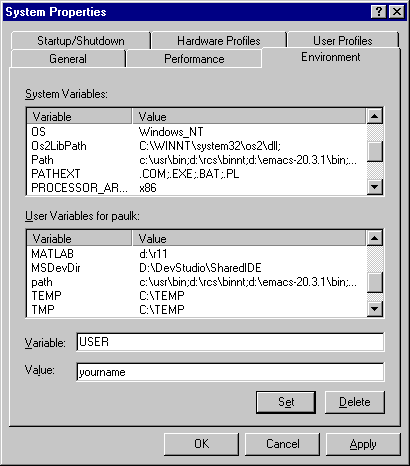
USER variable, enter USER in the Variable field, your login name in the Value field, and select the Set button. Then select OK to dismiss the dialog box.