Component
Object Linking Anchor
Category
Simulink
Description
The Object Linking Anchor component designates a location to which other links point. This component should have either the Model Loop, System Loop, Block Loop, or Signal Loop component as its parent.
Attributes
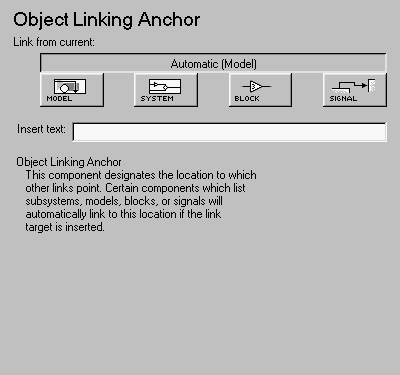
This is the Object Linking Anchor attribute page.
 Note:
Note:
To view a component attribute page in the Setup File Editor, select the component in the setup file outline on the left and click on the Options tab. If the component is not in the setup file outline, you must add it to the outline first. See Chapter 4 for a discussion on how to add a component to the outline.
- Link from current:
- This option sets the current model, system, block, or signal as the linking anchor:
- Select Automatic to automatically select the appropriate model, system, block or signal as a linking anchor. If the Model Loop component is the parent component, then the linking anchor is set on the current model. Similarly, if the System Loop, Block Loop, or Signal Loop is the parent component, then the linking anchor is inserted for the current system, block, or signal, respectively.
- Select Model to set the linking anchor to the current model.
- Select System to set the linking anchor to the current system.
- Select Block to set the linking anchor to the current block.
- Select Signal to set the linking anchor to the current signal.
- Insert text:
- If you want text to appear after the linking anchor, enter the text in this field.
Note:
You should not use the Object Linking Anchor component to create an anchor for an object that is anchored in the object summary table. See the Object Summary Table component reference page.
Insert anything into report?
Yes. A link, and possibly text, depending on attribute choices.
Filename
csl_linktarget
[ Previous | Help Desk | Next ]