| Use this button |
To do this |
 |
To move a parameter up in the list |
 |
To move a parameter down in the list |
 |
To remove a parameter from the list |
 |
To add a parameter to the list |
| Report Generator | Search Help Desk |
| Object Summary Table |
Category
SimulinkDescription
The Object Summary Table component shows properties or parameters of the selected Simulink models, systems, blocks, or signals in a table.Attributes
This is the Object Summary Table attribute page.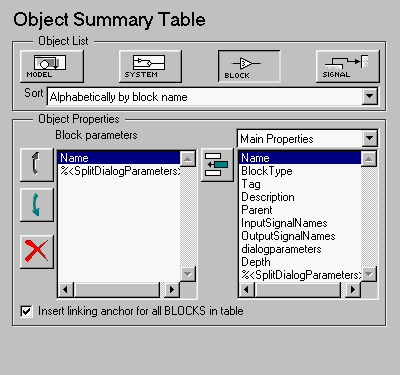 Note:
Note:
Object List
Select a Simulink object:Object Properties
Select which object parameters are included in the report in this section of the attribute page.Object Parameters
This list box shows all of the object parameters that are included in the report. To add a parameter to this list, select the parameter category from the drop box on the left, and then select parameters from the list box below it. Then click on the add button, shown in the table below. With the buttons shown in the table below, you can:| Use this button |
To do this |
|
To move a parameter up in the list |
|
To move a parameter down in the list |
|
To remove a parameter from the list |
|
To add a parameter to the list |
Summary Properties (req RTW) will not be listed in this drop box, since summary properties require Real-Time Workshop. If you are using a setup file that contains a summary property, then the property name appears in the report, but the property value does not.
The %<SplitDialogParameters> and the dialogparameters Properties
The%<SplitDialogParameters> property creates columns with the dialog parameter names as headings (one column for each parameter), and the dialog parameter values listed in the table cells below it. This property is valid for blocks only and creates multiple tables, one for each block type.
The dialogparameters property creates one column with dialogparameters as a heading and lists the dialog parameter names in the table cells below it.
For example, if your reported properties are Name and dialogparameters, then you will get the following object summary table| Name |
dialogparameters |
| Gain1 |
Gain |
| Gain2 |
Gain |
| Sum3 |
IconShape Inputs SaturateOnIntegerOverflow |
| T-Fcn1 |
Numerator Denominator |
Name and %<SplitDialogParameters> as your reported properties, then you will get the following three object summary tables, one for each blocktype. | Name |
Gain |
| Gain1 |
Mz |
| Gain2 |
5 |
| Name |
IconShape |
Inputs |
SaturdateOnIntegerOverflow |
| Sum3 |
round |
|++ |
0 |
| Name |
Numerator |
Denominator |
| Sum3 |
1 |
[1, -Mq] |
Example
If you are reporting on the demo model F14, and you choose the following options, then summary table shown on the next page is generated:
Insert anything into report?
Yes. Table.Filename
csl_summ_table