Component
Object Name
Category
Simulink
Description
The Object Name component inserts the name of a Simulink model, system, block or signal into the report.
This component can be used as the first subcomponent of a Chapter/Subsection component, which allows the current Simulink model, system block or signal name to be the chapter or section title.
Attributes
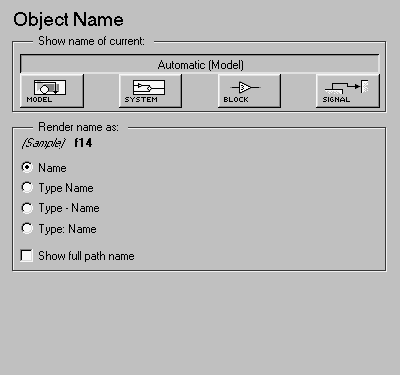
This is the Object Name attribute page.
 Note:
Note:
To view a component attribute page in the Setup File Editor, select the component in the setup file outline on the left and click on the Options tab. If the component is not in the setup file outline, you must add it to the outline first. See Chapter 4 for a discussion on how to add a component to the outline.
- Show name of current:
- Select Automatic to automatically select the appropriate model, system, block, or signal name as the Simulink object name to include in the report. If the Model Loop component is the immediate parent component, then the object name is the current model name. Similarly, if the System Loop, Block Loop, or Signal Loop is the parent component, then the object name is the name of the current system, block, or signal, respectively.
- Select Model to include the current model name in the report.
- Select System to include the current system name in the report.
- Select Block to include the current block name in the report.
- Select Signal to include the current signal name in the report. If the signal name is empty, then the signal
<handle> is included in the report. The signal handle is a unique numerical identifier to that signal.
- Render name as
- Select one of the options listed below to display the Simulink object name in the report:
- Show full path name
- Select this option to show the full path name for a system or block. For example, if you choose this option for a block, the Simulink block name will appear as:
Model Name/System Name/Block Name. Note that this option is not available for models and signals.
Insert anything into report?
Yes. Text.
Filename
cslsysname
[ Previous | Help Desk | Next ]