| Report Generator | Search Help Desk |
| Nest Setup File |
Category
Report GeneratorDescription
The Nest Setup File component runs another setup file at the point where the Nest Setup File component is listed in the current setup file. The Nest Setup File component allows one setup file (.rpt) to run inside of another.
The components of the inserted setup file enter the current setup file at the level of the Nest Setup File component. Thus, the inserted components have the same parent component as the Nest Setup File component. Make sure that the inserted components can have this parent component.
Attributes
This is the Nest Setup File attribute page.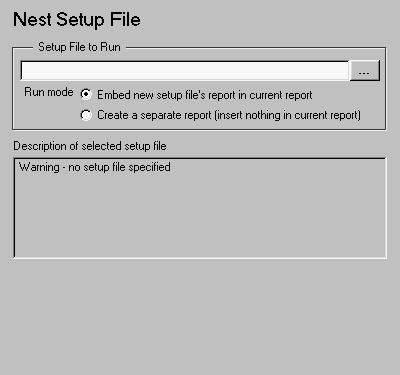 Note:
Note:
Setup File to Run
Enter the name of the setup file to import and run in this field or use the browse button (...) to find the file. This component executes only if you enter a valid filename in this field. report <SetupFileName>
Example
In the example shown below, the Embed new setup file's report in current report option was selected. Setup fileR2.rpt is being nested in R1.rpt.
The report will execute as if the original setup file looked like this:[-] Report - R1.rpt [-] Report - R2.rpt[ ] Chapter [ ] 1[-] B [ ] 2[ ] Nest Setfile - R2.rpt [-] Chapter[ ] C [ ] 4[ ] D [ ] 5
Components that determine their behavior from their parents such as Chapter/Subsection will be affected by components in the parent setup file (as shown above). See the Chapter/Subsection reference page for more details on the Chapter/Subsection component.[-] Report - R1.rpt[ ] Chapter[-] B[ ] 1[ ] 2[-] Section 1[ ] 4[ ] 5[ ] C[ ] D
Insert anything into report?
Yes, but only if you select the Embed new setup file's report in current report option.Filename
crgnestset