
| Report Generator | Search Help Desk |
| Import File |
Category
Report GeneratorDescription
The Import File component imports an ASCII text file.Attributes
This is the Import File attribute page.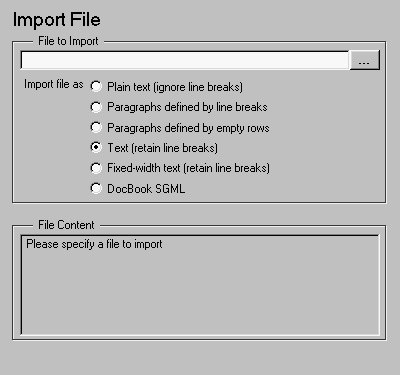 Note:
Note:
File to Import
Enter the name of the file to import in the text field in this section or use the browse button (...) to find the file. This component executes only if you enter a valid filename in this field.In this example and subsequent examples, the following text is used as the input file:
    This is the first row of text from the imported file.
        The second row follows a line break in the first row.

    There is a blank line above the third row.
With the Plain text (ignore line breaks) option, the following is produced.
With the Paragraphs defined by line breaks option, the following is produced.

With the Paragraphs defined by empty rows option, the following is produced.

With the Text (retain line breaks) option, the following is produced.

With the Fixed-width text (retain line breaks) option, the following is produced.

File Content
Insert anything into report?
Yes. Inserts text if you select one of the following options:Filename
crg_import_file