Component
Time/Date Stamp
Category
Report Generator
Description
The Time/Date Stamp component inserts the time and date of the report generation into your report as text. It must have the Paragraph or Chapter/Subsection component as its parent.
Attributes
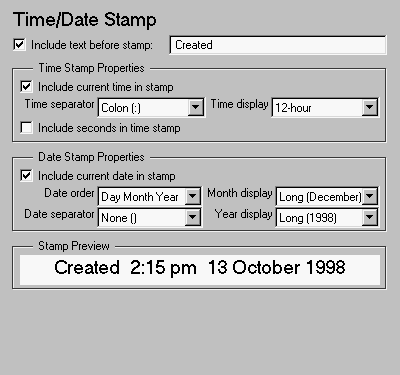
This is the Time/Date Stamp attribute page.
 Note:
Note:
To view a component attribute page in the Setup File Editor, select the component in the setup file outline on the left and click on the Options tab. If the component is not in the setup file outline, you must add it to the outline first. See Chapter 4 for a discussion on how to add a component to the outline.
- Include text before stamp:
- Select this option to include text before the time/date stamp and enter the text in the corresponding field.
Time Stamp Properties
- Include current time in stamp
- Select this option to insert the current time in the time/date stamp.
- Time Separator
- Use this option to select a separation marker between hours, minutes and seconds. The following options are available for the separator:
- Time display
- Use this option to select the appearance of the time display. The following options are available:
- Include seconds in time stamp
- Select this option to display seconds in the time/date stamp.
Date Stamp Properties
- Include current date in stamp
- Select this option to insert the current date in the time/date stamp.
- Date Order
- Use this option to select the order in which the day, month and year should appear. The following options are available for this order:
- Date Separator
- Use this option to select a separation marker between day, month and year. The following options are available for the separator:
- Month display
- Use this option to select the appearance of the month display. The following options are available for the display:
- Year display
- Use this option to select the appearance of the year display. The following options are available for the display:
Stamp Preview
- This field displays the time/date stamp as it will appear in the report.
Insert anything into report?
Yes. Text.
Filename
crgtds
[ Previous | Help Desk | Next ]