| Report Generator | Search Help Desk |
| Chapter/Subsection |
Category
FormattingDescription
The Chapter/Subsection component groups portions of the report into sections. Each section has a title and some content. The following rules apply to the Chapter/Subsection component:Chapter
Section 1
Section 2
Section 3
Section 4
Section 5
Section 6
No Section
Any Chapter/Subsection components beyond the sixth section do not create a titled section, although the subcomponents of these sections do insert information into the report.
Chapter Numbering
By default, chapters are numbered and sections are not numbered. Chapter and section numbering are specified by the stylesheet you choose in the Report Options attribute page. See Report Format and Stylesheets in Chapter 2 for chapter and section numbering options inWeb and Print stylesheets.Attributes
This is the Chapter/Subsection attribute page.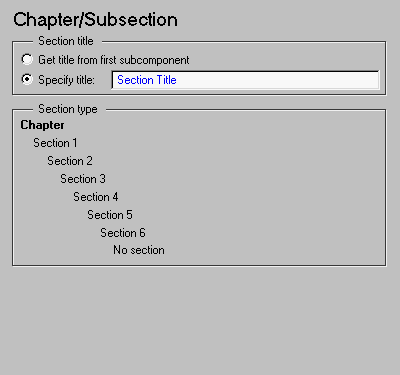 Note:
Note:
Section Title
%<VariableName> if you want to insert the value of a variable from the MATLAB workspace. Please see "%<VariableName> Notation" in the Text component reference page.Section Type
The item in boldface shows you what level the selected section is residing in. For example, if you have the following in the setup file outlineAnd you select the second Chapter/Subsection component, the Section Type hierarchy field will look like this:Chapter/SubsectionParagraphTextChapter/Subsection Paragraph Text
Chapter
    Section 1
        Section 2
            Section 3
                 Section 4
                     Section 5
                         Simple Section
                                  No Section
Section 1 appears in boldface to indicate the nesting level of the selected Chapter/Subsection component.
Insert anything into report?
Yes. Chapter or section.Filename
cfrsection