| Report Generator | Search Help Desk |
| Image |
Category
FormattingDescription
The Image component inserts an image from an external file into the report. The Image component can have the Chapter/Subsection or Paragraph component as its parent. If the Paragraph component is its parent, then the Insert as inline image check box must be checked.Attributes
This is the Image attribute page.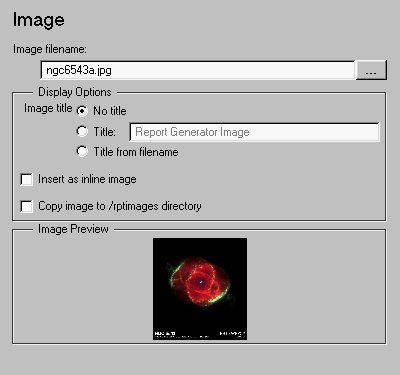 Note:
Note:
Display Options
    paragraph
        text - "This is an example of an inline image."
        text - "This is an example."
        image - *image.jpg*
        text - "This is an example of an inline image."
    This is an example of an inline image. This
    is an example. *image.jpg* This is
    an example of an inline image.
    This is an example of an inline image. This
    is an example.
    *image.jpg*
    This is an example of an inline image.
/rptimages directory. This option creates a relative link from the report to the copied image in the /rptimages directory. You should use this option:
/rptimages has the same parent directory as the report. You specify this in the Directory: option in the Report Options page in the Setup File Editor. See "Specifying the Directory for the Report File" in Chapter 2 for a discussion of the Directory: option.
Image Preview
The Image Preview frame shows the image that you specify in the Image file name field. You cannot preview postscript images or image with formats that are not supported by theimread function, such as .gif.
If you click on the image in the Image Preview frame, it is displayed in full size on the screen.
Insert anything into report?
Yes. Image.Filename
cfrimage