| Data Acquisition Toolbox | Search Help Desk |
Trigger Types and Trigger Conditions
Trigger types specify how data logging is initiated and is specified with theTriggerType property. You can think of the trigger type as the source of the trigger.
Depending on the TriggerType value, there may be associated trigger conditions. Trigger conditions determine the condition under which the specified trigger is issued. For some trigger conditions, you may need to specify a trigger condition value. Trigger conditions are specified with the TriggerCondition property. Trigger condition values are specified with the TriggerConditionValue property.
The supported trigger types and trigger conditions for analog input objects are shown below.TriggerType value is Immediate. An immediate trigger automatically occurs just after the start command is issued. If TriggerType is Manual, the trigger occurs just after you issue the trigger command. An example using a manual trigger is given in "Acquiring Data with a Sound Card". Software triggers are triggers that are issued by the engine when the associated trigger condition is satisfied. Using software triggers is illustrated in the example below.
Note:
SamplesPerTrigger are acquired before another trigger is issued.
Example: Voice Activation Using a Software Trigger
Suppose you want to collect voice data with a sound card, and the condition for collecting this data is based on how loudly you speak. An application of this kind is called voice activation. The example code shown below demonstrates how you set up an acquisition with a sound card based on voice activation. The sample rate is set to its maximum value and data is logged only after an acquired sample is greater than or equal to 0.2 volts with a rising (positive) slope. This condition is carried out by means of a software trigger. A portion of the collected data is then extracted from the engine and plotted. Initialization: Create the analog input object
 AIVoice for a sound card. The installed adaptors and hardware ID's are found with daqhwinfo.
Configuration: Add one hardware channel toAIVoice = analoginput('winsound');%AIVoice = analoginput('nidaq', 1);
AIVoice, and copy it to the variable chan, define a two second acquisition, and set up a software trigger. The source of the trigger is chan, and the trigger is issued when a rising voltage level has a value of at least 0.2 volts.
Execution: Startchan = addchannel(AIVoice, 1);%chan = addchannel(AIVoice, 0);set(AIVoice, 'SampleRate', 44100);duration = 2; % two second acquisitionActualRate = get(AIVoice, 'SampleRate');set(AIVoice, 'SamplesPerTrigger', ActualRate*duration);set(AIVoice, 'TriggerChannel', chan);set(AIVoice, 'TriggerType', 'Software');set(AIVoice, 'TriggerCondition', 'Rising');set(AIVoice, 'TriggerConditionValue', 0.2);
AIVoice, wait for AIVoice to stop running, and extract the first 1000 samples from the engine as sample-time pairs. Display the number of samples remaining in the engine.
Termination: Plot all the extracted data and deletestart(AIVoice);while strcmp(AIVoice.Running, 'On') end[d, t] = getdata(AIVoice, 1000);remsamp = num2str(AIVoice.SamplesAvailable); disp(['Number of samples remaining in engine: ', remsamp])
AIVoice.
plot(t, d)drawnowxlabel('Time (sec.)')ylabel('Signal Level (Volts)')title(sprintf('daqdoc4\\_4\nVoice Activation')) grid on delete(AIVoice)
 Note that when using software triggers, you must specify the
 TriggerType value before the TriggerCondition value. The output from this example is shown below. 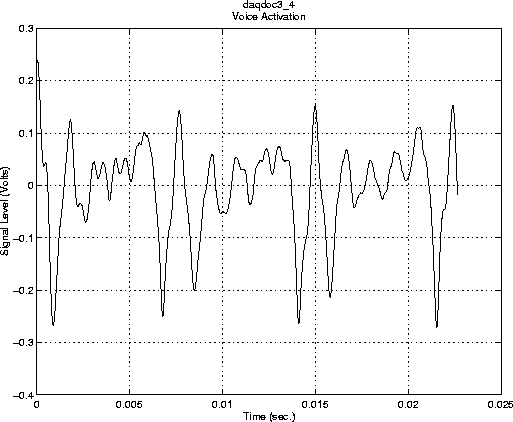
getdata command is issued, there remains 87,200 samples in the engine.
AIVoice.SamplesAvailable
ans =
       87200