| Data Acquisition Toolbox | Search Help Desk |
Trigger Delays
Under certain circumstances, you may want to specify a trigger delay. Trigger delays allow you to control exactly when data is logged after a trigger is issued. You can log data before a trigger is issued or after a trigger is issued. Trigger delays are specified with theTriggerDelay property.
Logging data before a trigger is issued is called pretriggering, while logging data after a trigger is issued is called postriggering. Pretriggers are specified with negative TriggerDelay values, while postriggers are specified with positive TriggerDelay values. Logging can be delayed in time or in samples using the TriggerDelayUnits property. When TriggerDelayUnits is set to Samples, data logging is delayed by the specified number of samples. When the TriggerDelayUnits property is set to Seconds, data logging is delayed by the specified number of seconds. Pretrigger data and postrigger data are described below.
Pretrigger Data
In some circumstances, you may want to capture data before the trigger occurs. Such data is called pretrigger data. For example, you may want to examine the noise seen by your detector before it provides well-behaved output. Since it can be difficult to characterize a noisy signal in terms of triggering on a voltage level, it may be easier to capture that data as pretrigger data. When specifying pretrigger data to capture, theSamplesPerTrigger value reflects both the data captured before and after the trigger occurs. Pretriggering is illustrated in the figure below.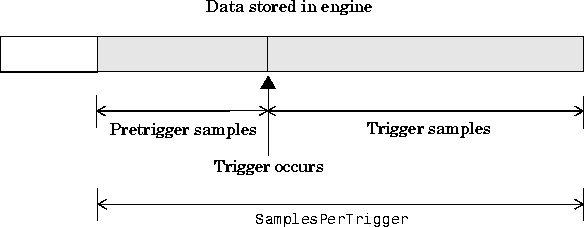
TriggerType value is Immediate.
Postrigger Data
You may want to capture data after the trigger occurs. Such data is called postrigger data. When specifying postrigger data to capture, theSamplesPerTrigger value and the postrigger samples are equal. Postriggering is illustrated in the figure below.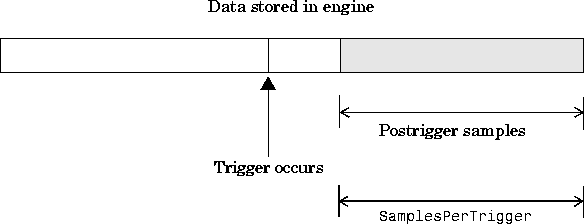
Example: Voice Activation and Pretriggers
This example modifies the previous voice activation example such that 500 pretrigger samples are collected. Initialization: Create the analog input object
 AIVoice for a sound card. The available adaptors are found with daqhwinfo.
Configuration: Add one hardware channel toAIVoice = analoginput('winsound');%AIVoice = analoginput('nidaq', 1);
AIVoice, and copy it to the variable chan, define a two second acquisition, and set up a software trigger. The source of the trigger is chan, and the trigger is issued when a rising voltage level has a value of at least 0.2 volts. Additionally, 500 pretrigger samples are collected.
Execution: Startchan = addchannel(AIVoice, 1);%chan = addchannel(AIVoice, 0);set(AIVoice, 'SampleRate', 44100);duration = 2; % two second acquisitionActualRate = get(AIVoice, 'SampleRate');set(AIVoice, 'SamplesPerTrigger', ActualRate*duration);set(AIVoice, 'TriggerChannel', chan);set(AIVoice, 'TriggerType', 'Software');set(AIVoice, 'TriggerCondition', 'Rising');set(AIVoice, 'TriggerConditionValue', 0.2);set(AIVoice, 'TriggerDelay', -500) set(AIVoice, 'TriggerDelayUnits', 'Samples');
AIVoice, wait for AIVoice to stop running, and extract the first 1000 samples from the engine as and return them as sample-time pairs.
Termination: Plot all the extracted data and deletestart(AIVoice);while strcmp(AIVoice.Running, 'On') end[d, t] = getdata(AIVoice, 1000);
AIVoice.
plot(t, d)xlabel('Time (sec.)')ylabel('Signal Level (Volts)')title(sprintf('daqdoc4\\_5\nVoice Activation with Pretriggering')) grid on delete(AIVoice)
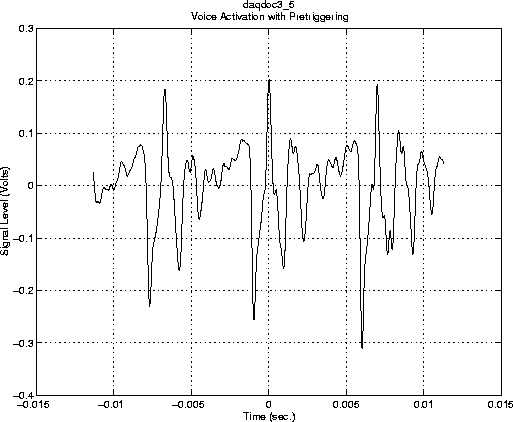
 The output from this example is shown below. Note that the pretrigger data constitutes half of the 1000 samples extracted from the engine. Additionally, pretrigger data has negative time associated with it since time = 0 corresponds to the time the trigger occurs and data logging is initiated.