| Data Acquisition Toolbox | Search Help Desk |
Repeating Triggers
Triggers may be configured to occur once (one-shot acquisition) or repeated times. Trigger repeats are controlled with theTriggerRepeat property. If TriggerRepeat is set to its default value of 0, then the trigger occurs once when the trigger condition is met. If TriggerRepeat is set to a positive integer value, then the trigger is repeated the specified number of times when the trigger condition is met. If TriggerRepeat is set to Inf then the trigger repeats continuously when the trigger condition is met and the data acquisition can be stopped only with an explicit stop command.
Example: Voice Activation and Repeating Triggers
In this example, two triggers are issued. An amount of data given bySamplesPerTrigger is acquired for each trigger and stored in a separate variable. The Timeout value is set to five seconds. Therefore, if getdata does not return the specified number of samples in five seconds plus the amount of time required to acquire the data, the acquisition will be aborted.
 Initialization: Create the analog input object
 AIVoice for a sound card. The available adaptors are found with daqhwinfo.
Configuration: Add one hardware channel toAIVoice = analoginput('winsound');%AIVoice = analoginput('nidaq', 1);
AIVoice, and copy it to the variable chan, define a one second acquisition, and set up a software trigger. The source of the trigger is chan, and the trigger is issued when a rising voltage level has a value of at least 0.2 volts. Additionally, the trigger is repeated once when the trigger condition is met.
Execution: Startchan = addchannel(AIVoice, 1);%chan = addchannel(AIVoice, 0);set(AIVoice, 'SampleRate', 44100);duration = 0.5; % half second acquisition for each triggerActualRate = get(AIVoice, 'SampleRate');set(AIVoice, 'Timeout', 5);set(AIVoice, 'SamplesPerTrigger', ActualRate*duration);set(AIVoice, 'TriggerChannel', chan);set(AIVoice, 'TriggerType', 'Software');set(AIVoice, 'TriggerCondition', 'Rising');set(AIVoice, 'TriggerConditionValue', 0.2);set(AIVoice, 'TriggerRepeat', 1);
AIVoice, wait for AIVoice to stop running, extract all the data from the first trigger as sample-time pairs, and extract all the data from the second trigger as sample-time pairs. Note that the data acquired from both triggers can be extracted with one getdata call by specifying getdata(AIVoice, 44100).
Termination: Plot the data for both triggers and deletestart(AIVoice);while strcmp(AIVoice.Running, 'On') end[d1, t1] = getdata(AIVoice);[d2, t2] = getdata(AIVoice);
AIVoice.
subplot(211); plot(t1, d1); grid on; hold onaxis([t1(1)-0.05 t1(end)+0.05 -0.8 0.8]) xlabel('Time (sec.)'); ylabel('Signal level (Volts)'); title(sprintf('daqdoc4\\_6\nVoice Activation First Trigger')) subplot(212); plot(t2, d2); grid on;axis([t2(1)-0.05 t2(end)+0.05 -0.8 0.8]) xlabel('Time (sec.)'); ylabel('Signal level (Volts)'); title('Voice Activation Second Trigger'); delete(AIVoice)
 The data acquired for both triggers is shown below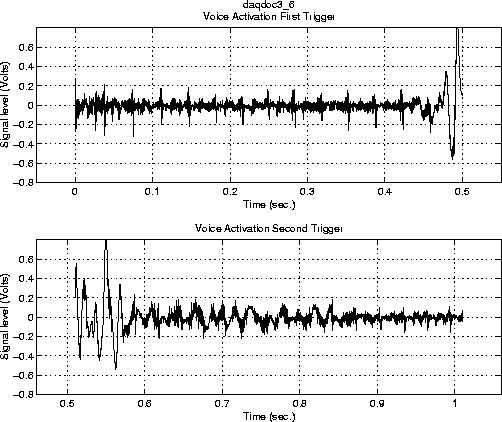
TriggerTime property. To find out how many triggers occurred, you can use MATLAB's length command
NumTrigs = length(AIVoice.TriggerTime)
TriggerTime array from the datenum format to a string. For example, the time of the first trigger is calculated below.
times = AIVoice.TriggerTime;
time1_str = datestr(times(1), 13)
time1_str =
14:08:50
You can also return data from multiple triggers with one call to
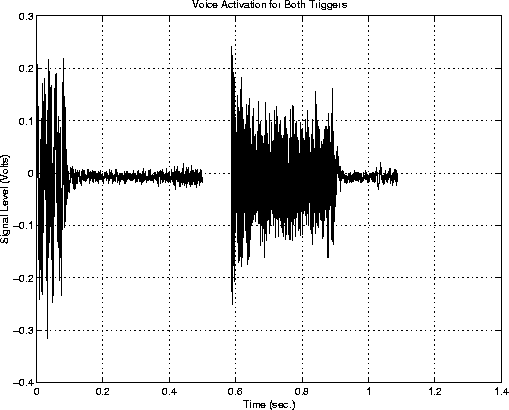
getdata by specifying the appropriate amount of data. This number is given by (SamplesPerTrigger) × (TriggerRepeat + 1). When you return data that spans multiple triggers, a NaN is inserted in the data stream between triggers. Therefore, an extra "sample" (the NaN) is stored in the engine and returned by getdata. Identifying these NaNs allows you to identify where and when each trigger was issued in the data stream.
The figure below illustrates the data stored by the engine during a multiple-trigger acquisition, and the relationship between SamplesPerTrigger and the time recorded by TriggerTime. The first element of TriggerTime corresponds to t1, the second trigger time corresponds to t2, and so on.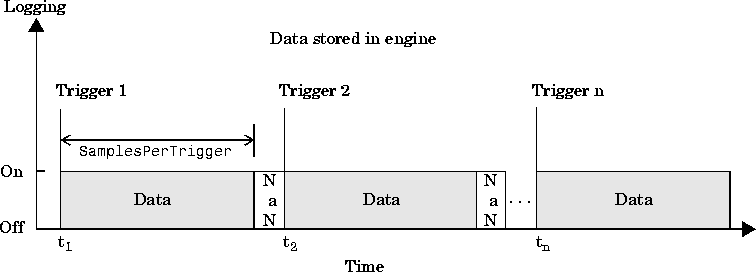
getdata.
returndata =The data is shown below.ActualRate*duration*(AIVoice.TriggerRepeat + 1)start(AIVoice);[d, t] = getdata(AIVoice, returndata);% Set up data plotsplot(t, d);xlabel('Time (sec.)');ylabel('Signal Level (Volts)');title('Voice Activation for Both Triggers'); grid on;
abstimes = AIVoice.TriggerTime;
reltimes = (abstimes-abstimes(1))*3600*24
reltimes =
         0
     0.5980
Another way to find the relative trigger times is to search for NaNs in the returned data. You can find the index location of the NaN in d or t using the isnan function.
index = find(isnan(d))
index =
       22051
With this information, you can find the relative time that the second trigger was issued.
t2time = t(index+1)
t2time =
    0.5980