| Data Acquisition Toolbox | Search Help Desk |
Configuring Triggers for National Instruments Hardware
When using National Instruments (NI) hardware, there are additional trigger types and trigger conditions that you must be aware of. These device-specific property values are described below and in Appendix A. Note:Trigger Types and Trigger Conditions
The additional trigger types and trigger conditions for analog input objects associated with National Instruments hardware fall into two main types: hardware digital triggering and hardware analog triggering. These trigger types and the associated trigger conditions are described below.TriggerType is set to HwDigital, the trigger is given by a TTL signal. The code below illustrates how to configure such a trigger.
ai = analoginput('nidaq',1);
addchannel(ai, 0:7);
set(ai, 'TriggerType', 'HwDigital')
The diagram below illustrates how a digital trigger signal is connected to an AT-MIO/AI E series board.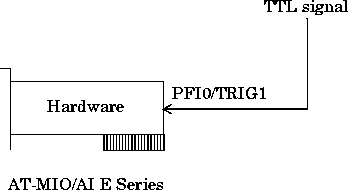
TriggerType is set to HwAnalogPin, the trigger is given by a low-range analog signal (typically between -10 to 10 volts). The code below illustrates how to configure such a trigger.
ai = analoginput('nidaq',1);
addchannel(ai, 0:7);
set(ai, 'TriggerType', 'HwAnalogPin')
set(ai, 'TriggerCondition', 'InsideRegion')
set(ai, 'TriggerConditionValue', [-4.0 4.0])
If TriggerType is set to HwAnalogChannel, the trigger is given by an analog signal and the trigger channel is defined as the first channel of the channel list (MATLAB index of one). The valid range of the analog trigger signal is given by the full-scale range of the trigger channel. The code below illustrates how to configure such a trigger where the trigger channel is assigned the descriptive name TrigChan and the default TriggerCondition property value is used.
ai = analoginput('nidaq',1);
addchannel(ai, 0:7);
set(ai.Channel(1), 'ChannelName', 'TrigChan')
set(ai, 'TriggerType', 'HwAnalogChannel')
set(ai, 'TriggerConditionValue', 0.2)
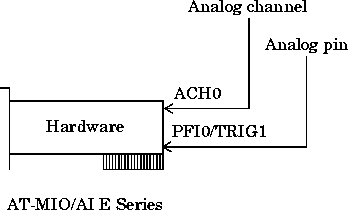
The diagram below illustrates how analog trigger signals can be connected to an AT-MIO/AI E series board.