| Using Stateflow | Search Help Desk |
Label the Transitions
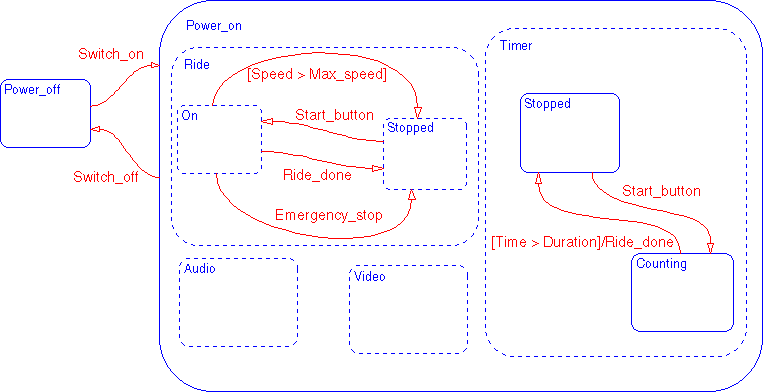
The general format of a transition label isevent[condition]{condition_action}/transition_actionIn this example, there are eight transitions to label. Use the transition labels in the solution Stateflow diagram as a guide. These steps show how to label the transitions:
Power_on.Ride.Stopped to the
substate Power_on.Ride.On. Select the transition. Click on the ? alongside
the transition and enter the label Start_button. Deselect the transition
label (press the Escape key) to exit the edit. You label one transition in this
step. To move a transition label, click and drag the left mouse button to the
new desired location and then release the mouse button. If you mistakenly
click and release the left mouse button, you will be in label edit mode.
Deselect the label and try again.
Power_on.Ride superstate. You label
three transitions in this step.
Timer superstates. You label two transitions in
this step.
Power_off substate. You label two
transitions in this step.
Sample Snapshot
Your Stateflow diagram should now look similar to this Stateflow diagram.