| Using Stateflow | Search Help Desk |
Create the Transitions
These steps show how to create the transitions:Ride superstate. Using the solution as
a guide, place the cursor at a straight portion of the side border of the
Power_on.Ride.Stopped substate. Click the border when the cursor changes
to a crosshair. Without releasing the mouse button, drag the mouse to a
straight portion on the side border of the Power_on.Ride.On substate. When
the transition snaps to the border, release the mouse button. Transitions
cannot be attached on corners since corners are used for resizing. You create
one transition in this step.
Ride superstate. You create
three transitions in this step.
Timer superstate. You create two
transitions in this step.
Power_off state. You create two
transitions in this step.
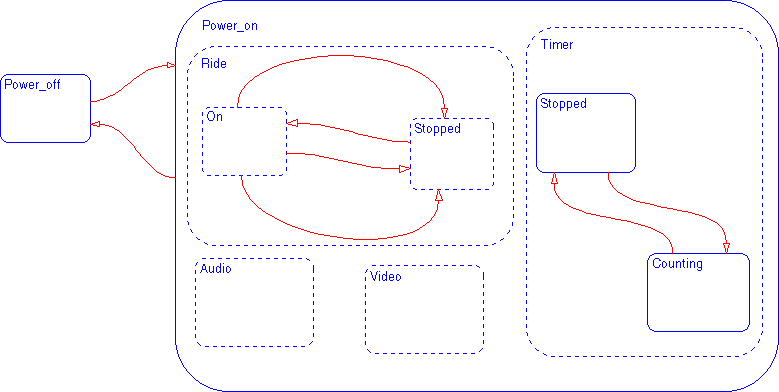
Sample Snapshot
Your Stateflow diagram should now look similar to this Stateflow diagram.