Chapter 5
Exploring and Searching
Overview
Exploring and Searching
The Stateflow machine is the highest level in the Stateflow hierarchy. The object hierarchy beneath the Stateflow machine consists of combinations of the graphical and nongraphical objects. The data dictionary is the repository for all Stateflow objects. You can use the Stateflow Finder and Stateflow Explorer together to browse and make changes to data dictionary objects.
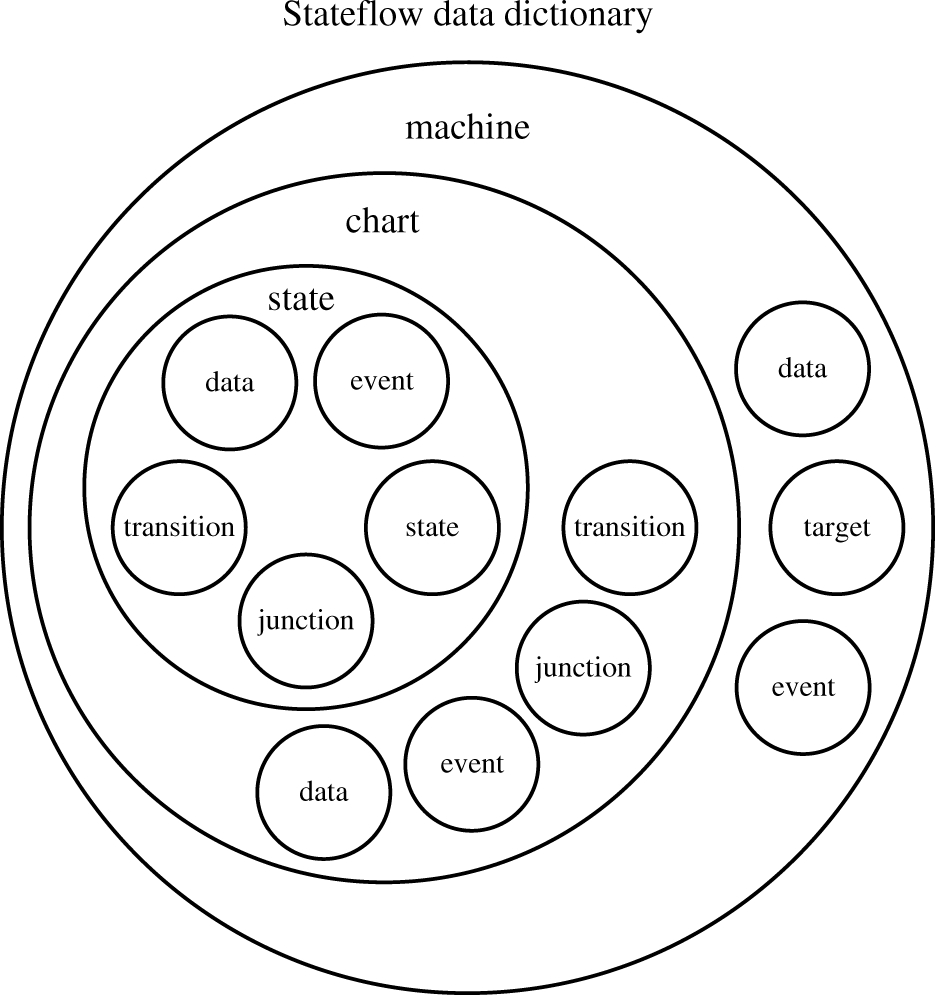
The Explorer displays any defined events, data, and targets within an object hierarchy where machines, charts, and states are potential parents.
You can create, modify, and delete events, data, and target objects using the Explorer. You can also add events, data, and targets using the graphics editor Add menu. (See "Defining Events" for more information.) If you add data or events via the Add menu, the chart is automatically defined as the parent. If you add a target, the machine is defined as the parent. Targets can only be parented by the machine. If you want to change the parent of a data or event object, you must use the Explorer to do so. Similarly you must use the Explorer if you want to delete an event, data, or target object.
See "Configuring a Target" for information on customizing the simulation target. See "Adding a Target to a State Machine's Target List" for information on creating targets to generate code using the Stateflow Coder product.
The Finder displays a list of objects based on search criterion you specify. You can directly access the properties dialog box of any object in the search output display by double-clicking on that object.
The Finder, the Explorer, and the Add menu on the graphics editor provide access to the event, data, and target properties dialog boxes.
[ Previous | Help Desk | Next ]