| Using Simulink | Search Help Desk |
| Inport |
Create an input port for a subsystem or an external input.
Library
Signals & SystemsDescription
Inport Blocks in a Subsystem
Inport blocks in a subsystem represent inputs to the subsystem. A signal arriving at an input port on a Subsystem block flows out of the associated Inport block in that subsystem. The Inport block associated with an input port on a Subsystem block is the block whose Port number parameter matches the relative position of the input port on the Subsystem block. For example, the Inport block whose Port number parameter is 1 gets its signal from the block connected to the top-most port on the Subsystem block. If you renumber the Port number of an Inport block, the block becomes connected to a different input port, although the block continues to receive its signal from the same block outside the subsystem. The Inport block name appears in the Subsystem block icon as a port label. To suppress display of the label, select the Inport block and choose Hide Name from the Format menu. Then, choose Update Diagram from the Edit menu.Inport Blocks in a Top-Level System
Inport blocks in a top-level system have two uses: to supply external inputs from the workspace, which you can do by using either the Simulation Parameters dialog box or thesim command, and to provide a means for analysis functions to perturb the model:
ut argument of the sim command (see sim).
linmod and trim analysis functions. Inport blocks define the points where inputs are injected into the system. For information about using Inport blocks with analysis commands, see Chapter 5.
Data and Numeric Type Support
An inport accepts real- or complex-valued signals of any data type. The data type and numeric type of the output of an inport is the same as that of the corresponding input signal. You must specify the signal type and data type of an external (i.e., workspace) input to a root-level inport, using the inport's Signal type and Data type parameters. The elements of an signal vector connected to a root-level inport must be of the same numeric type and data type. Signal elements connected to a subsystem import may be of differing numeric and data types except in one instance. If the subsystem contains an Enable or Trigger block and the inport is connected directly to an outport, the input elements must be of the same type. For example, consider the follow enabled subsystem.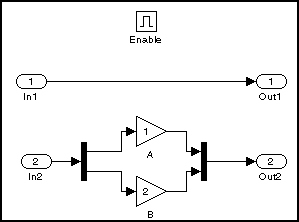
In1 must be of the same type. The elements connected to In2, however, may be of differing types.
Parameters and Dialog Box
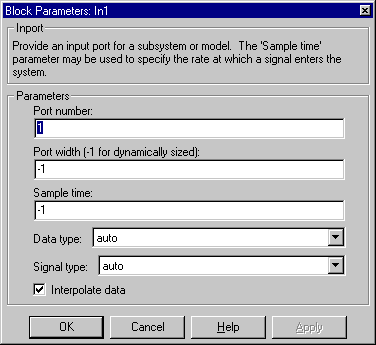
-1 to have it automatically determined.Characteristics
| Sample Time |
Inherited from driving block |
| Vectorized |
Yes |