Using Simulink     Search    Help Desk 

Zero Crossings

Simulink uses zero crossings to detect discontinuities in continuous signals. Zero crossings play an important role in:

State Event Handling

A system experiences a state event when a change in the value of a state causes the system to undergo a distinct change. A simple example of a state event is a bouncing ball hitting the floor. When simulating such a system using a variable-step solver, the solver typically does not take steps that exactly correspond to the times that the ball makes contact with the floor. As a result, the ball is likely to overshoot the contact point, which results in the ball penetrating the floor.

Simulink uses zero crossings to ensure that time steps occur exactly (within machine precision) at the time state events occur. Because time steps occur at the exact time of contact, the simulation produces no overshoot and the transition from negative to positive velocity is extremely sharp (that is, there is no rounding of corners at the discontinuity). To see a bouncing ball demo, type bounce at the MATLAB prompt.

Integration of Discontinuous Signals

Numerical integration routines are formulated on the assumption that the signals they are integrating are continuous and have continuous derivatives. If a discontinuity (state event) is encountered during an integration step, Simulink uses zero crossing detection to find the time at which the discontinuity occurs. An integration step is then taken up to the left edge of the discontinuity. Finally, Simulink steps over the discontinuity and begins a new integration step on the next piece-wise continuous portion of the signal.

Implementation Details

An example of a Simulink block that uses zero crossings is the Saturation block. Zero crossings detect these state events in the Saturation block:

Simulink blocks that define their own state events are considered to have intrinsic zero crossings. If you need explicit notification of a zero crossing event, use the Hit Crossing block. See "Blocks with Zero Crossings" for a list of blocks that incorporate zero crossings.

The detection of a state event depends on the construction of an internal zero crossing signal. This signal is not accessible by the block diagram. For the Saturation block, the signal that is used to detect zero crossings for the upper limit is zcSignal = UpperLimit - u, where u is the input signal.

Zero crossing signals have a direction attribute, which can have these values:
For the Saturation block's upper limit, the direction of the zero crossing is either. This enables the entering and leaving saturation events to be detected using the same zero crossing signal.

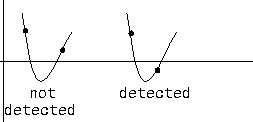
If the error tolerances are too large, it is possible for Simulink to fail to detect a zero crossing. For example, if a zero crossing occurs within a time step, but the values at the beginning and end of the step do not indicate a sign change, the solver will step over the crossing without detecting it.

This figure shows a signal that crosses zero. In the first instance, the integrator "steps over" the event. In the second, the solver detects the event.


If you suspect this is happening, tighten the error tolerances to ensure that the solver takes small enough steps. For more information, see "Error Tolerances".

Caveat

It is possible to create models that exhibit high frequency fluctuations about a discontinuity (chattering). Such systems typically are not physically realizable; a mass-less spring, for example. Because chattering causes repeated detection of zero crossings, the step sizes of the simulation become very small, essentially halting the simulation.

If you suspect that this behavior applies to your model, you can disable zero crossings by selecting the Disable zero crossing detection check box on the Diagnostics page of the Simulation Parameters dialog box. Although disabling zero crossing detection may alleviate the symptoms of this problem, you no longer benefit from the increased accuracy that zero crossing detection provides. A better solution is to try to identify the source of the underlying problem in the model.

Blocks with Zero Crossings

Table 9-1: Blocks with Intrinsic Zero Crossings 
Block
Description of Zero Crossing
Abs
One: to detect when the input signal crosses zero in either the rising or falling direction.
Backlash
Two: one to detect when the upper threshold is engaged, and one to detect when the lower threshold is engaged.
Dead Zone
Two: one to detect when the dead zone is entered (the input signal minus the lower limit), and one to detect when the dead zone is exited (the input signal minus the upper limit).
Hit Crossing
One: to detect when the input crosses the threshold. These zero crossings are not affected by the Disable zero crossing detection check box in the Simulation Parameters dialog box.
Integrator
If the reset port is present, to detect when a reset occurs. If the output is limited, there are three zero crossings: one to detect when the upper saturation limit is reached, one to detect when the lower saturation limit is reached, and one to detect when saturation is left.
MinMax
One: for each element of the output vector, to detect when an input signal is the new minimum or maximum
Relay
One: if the relay is off, to detect the switch on point. If the relay is on, to detect the switch off point.
Relational Operator
One: to detect when the output changes.
Saturation
Two: one to detect when the upper limit is reached or left, and one to detect when the lower limit is reached or left.
Sign
One: to detect when the input crosses through zero.
Step
One: to detect the step time.
Subsystem
For conditionally executed subsystems: one for the enable port if present, and one for the trigger port, if present.
Switch
One: to detect when the switch condition occurs.


[ Previous | Help Desk | Next ]