Report Generator
  Go to Component
    Search    Help Desk 
Model Property Table

Component

Model Property Table

Category

Simulink

Description

The Model Property Table component inserts a table which reports on model-level property-value pairs.

Attributes

This is the Model Property Table attribute page.
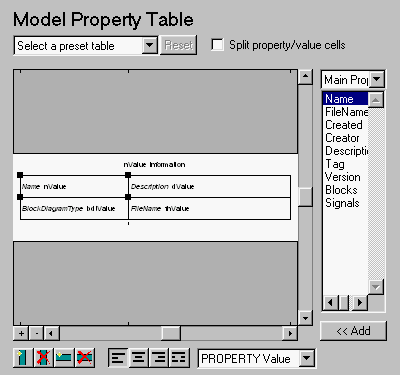
Note:
To view a component attribute page in the Setup File Editor, select the component in the setup file outline on the left and click on the Options tab. If the component is not in the setup file outline, you must add it to the outline first. See Chapter 4 for a discussion on how to add a component to the outline.

The Model Property Table is similar to the Handle Graphics Figure Property Table. See the Handle Graphics Figure Property Table for reference.

Note that if you do not have Real-Time Workshop, Summary Properties (req RTW) will not be listed in this drop box, since summary properties require Real-Time Workshop. If you are using a setup file that contains a summary property, then the property name appears in the report, but the property value does not.

Example

The table below is an example of a model property table. It is the Simulation Parameters preset table. This property table is reporting the F14 demo model.

Solver ode45
ZeroCross on
StartTime 0.0 StopTime 60
RelTol 1e-4
AbsTol 1e-6
Refine 1
InitialStep auto
FixedStep auto
MaxStep auto
LimitMaxRows off
MaxRows 1000
Decimation 1

Insert anything into report?

Yes. Table.

Filename

csl_mdl_proptable


[ Previous | Help Desk | Next ]