| Report Generator | Search Help Desk |
| Insert Variable |
Category
MATLABDescription
The Insert Variable component takes one of the following variables and inserts its value (and name, if you choose to do so) into the report:Attributes
This is the Insert Variable attribute page.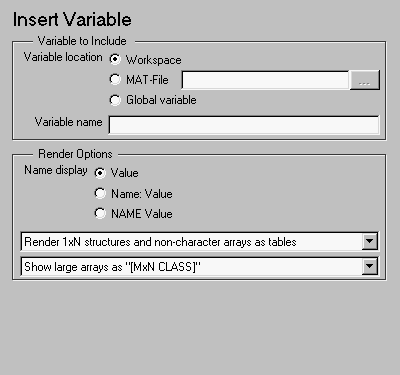 Note:
Note:
Variable to Include
%<VariableName> to insert the value of a variable from the MATLAB workspace. For example, if you enter the following expression in this field:%<my_variable>
    my_variable='velocity'
    velocity=50
50
%<velocity> in this field, and your MATLAB workspace contains the same information, then your report will also contain 50.Render Options
- displays the value of the variable only (e.g., if the variable is velocity, and its value is 25, only 25 is displayed).
- displays the variable name, followed by the value of the variable (e.g., Velocity: 25)
25)
to display large variable arrays as "[MxN CLASS]". For example, if you have a 300-by-200 double array, it will display in the report as [300x200 DOUBLE].
Insert anything into report?
Yes. Text.Filename
cmlvariable