Report Generator
  Go to Component
    Search    Help Desk 
Evaluate MATLAB Expression

Component

Evaluate MATLAB Expression

Category

MATLAB

Description

The Evaluate MATLAB Expression component evaluates a specified MATLAB expression in the workspace. The code and/or command line output can be inserted into the report.

Attributes

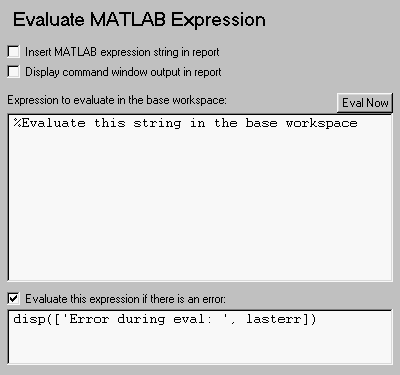
This is the Evaluate MATLAB Expression attribute page.
Note:
To view a component attribute page in the Setup File Editor, select the component in the setup file outline on the left and click on the Options tab. If the component is not in the setup file outline, you must add it to the outline first. See Chapter 4 for a discussion on how to add a component to the outline.

Insert MATLAB expression string in report
Select this option if you want the MATLAB expression that is evaluated by this component to appear in the report.
Display command window output in report
Select this option if you want to include the command window output that results when the MATLAB expression is evaluated.
Expression to evaluate in the base workspace:
Enter the expression that you want to evaluate in the MATLAB workspace.
Evaluate this expression if there is an error:
Select this option if you want to evaluate another MATLAB expression if the evaluated expression produces an error. Enter the expression that should be evaluated in case of an error in this field.

Insert anything into report?

Inserts text if you select one of the following options:

Otherwise, this component does not insert anything into the report.

Filename

cmleval


[ Previous | Help Desk | Next ]