| Report Generator | Search Help Desk |
| Variable Table |
Category
MATLABDescription
The Variable Table component creates and inserts a table that includes all variables in the MATLAB workspace. You can find all the variables in the MATLAB workspace by typingwhos at the command line.
Attributes
This is the Variable Table attribute page.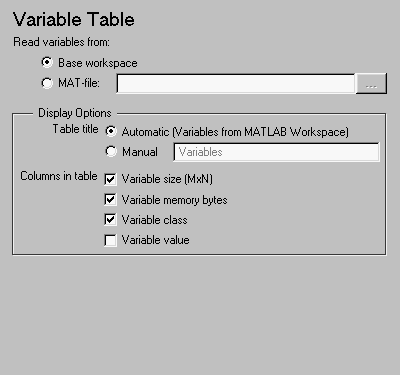 Note:
Note:
Display Options
"[MxN CLASS]". For example, if you have a 300-by-200 double array, it will display in the report as [300x200 DOUBLE].
Example
This is an example of a variable table that includes variable size, variable memory bytes, and variable value information in the table columns.| name |
size |
bytes |
Value |
| aCell |
1x2 |
238 |
{ [ 1 2 3 4 ] Speed (kph) } |
| aNumber |
1x1 |
8 |
1 |
| aString |
1x11 |
22 |
Speed (kph) |
| aStructure |
1x1 |
302 |
[struct w/ fields: Inputs, Outputs] |
| aVector |
1x4 |
32 |
[ 1 2 3 4 ] |
Insert anything into report?
Yes. Table.Filename
cmlwhos