| DSP Blockset | Search Help Desk |
Running Operations
A running operation is one that processes successive sample-based or frame-based inputs, and computes a result that reflects both present and past inputs. A reset port enables you to restart this tracking at any time. The running statistic is computed for each input channel independently, so the block's output has the same number of channels as the input. Sample-based inputs: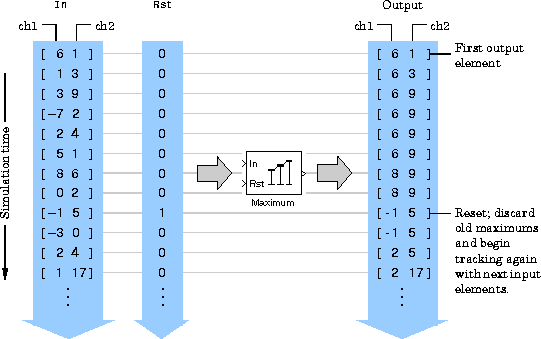
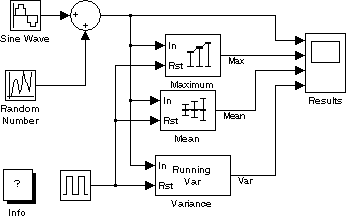
Demonstration Model: Running Operation
The DSP Blockset includes a demo that illustrates the running mode of a few statistics blocks. To try the demo model:demos at the MATLAB command line.
Example: Sliding Windows
You can use the basic statistics operations in conjunction with the Buffer block to implement basic sliding window statistics operations. A sliding window is like a stencil that you move along a data stream, exposing only a set number of data points at one time. For example, you may want to process data in 10-point frames, moving the window along by one sample point for each operation. One way to implement a sliding window is shown below:
The Buffer block's Buffer size (Mo) parameter determines the size of the window. The Buffer overlap (L) parameter defines the "slide factor" for the window. At each sample instant, the window slides by Mo-L points. The Buffer overlap is often Mo-1 (the same as the Shift Register block), so that a new statistic is computed for every new signal sample.
Construct the model using:A = 1:256;
1000.
0.0
25.6, the length of A multiplied by the sample period.
yout variable. yout(129) contains the mean for the first 128 points of the test vector A. Note that yout(1) is 0, which was the initial output of the Buffer block.